
If you’re running PPC Google Ads Indianapolis campaigns and still getting leads from places you can’t (or won’t) serve, it’s usually not a keyword problem—it’s a location settings problem. Google’s location targeting uses multiple signals and isn’t guaranteed to be 100% accurate, so the goal isn’t perfection. The goal is building a setup that minimizes waste, protects lead quality, and gives you proof of where your conversions are really coming from.
Below is a practical, Indy + suburbs playbook focused on the settings that most often cause budget leakage—and the fixes that reliably tighten up performance.
What do Google Ads location settings actually control?
Google Ads location targeting has three levers that determine who can see your ads:
- Targeted locations (cities, ZIPs, counties, radii, etc.)
- Advanced location options (the big one: people physically there vs people “interested” in the area)
- Location exclusions (places you explicitly block)
What trips local businesses up is assuming “I selected Indianapolis” means “only people currently in Indianapolis will see my ads.” By default, Google can include people in, regularly in, or who’ve shown interest in the location—depending on your advanced settings.
What’s the difference between “Presence” and “Presence or interest,” and which one should local businesses use?
Presence (often phrased like “People in or regularly in your targeted locations”) focuses on users who are physically located in—or routinely in—your geo. Presence or interest adds people who show interest in the location, even if they’re elsewhere.
For most local lead-gen campaigns (home services, med/dental, legal, local B2B), the safer default is Presence because it reduces out-of-area clicks and “researchers” who aren’t actually going to become a customer. Google explicitly frames these as choices you can make depending on whether you want physical location, locations of interest, or both.
One more critical nuance: Google notes that advanced location options apply to Search and Display (not everything). So you can do everything right in Search and still see broader behavior elsewhere if you’re running other campaign types.
When does “Presence or interest” actually make sense for Indy-area campaigns?
Use Presence or interest when “not physically in Indy yet” can still be a real buyer:
- Relocation-driven services (real estate, movers, schools/training programs)
- Destination intent (venues, events, specialty appointments planned in advance)
- High-consideration specialties where people shop before they travel (certain medical specialties, large projects)
If you choose Presence or interest, it should come with guardrails:
- tighter keywords and ad copy that qualifies the service area
- heavier negative keyword use (jobs, “moving to,” “salary,” etc. where relevant)
- more aggressive location exclusions and weekly location-report checks
The reason is simple: Google’s targeting relies on multiple signals and isn’t perfectly accurate in every case—so broader settings magnify the “messiness.”
How should you structure Indianapolis + suburbs targeting without overpaying for the wrong clicks?
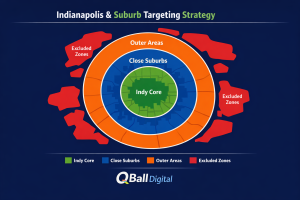
A clean approach is to structure by service reality, not map aesthetics:
- Campaign A: Indy core (where you want volume and can respond quickly)
- Campaign B: Close-in suburbs (higher intent, often stronger close rates)
- Campaign C: Outer ring (only if unit economics support longer drives)
Why split? Because one “big bucket” forces one budget and one CPA target to serve areas that behave differently. Suburbs can produce fewer clicks but higher-quality leads; outer rings might be lower conversion rate but higher ticket size. Splitting lets you price and prioritize those tradeoffs deliberately.
If you don’t want multiple campaigns, you can still mirror this logic with location groups + bid adjustments (where supported) and separate ad groups/landing paths. (But campaign splits are usually cleaner when you’re serious about controlling cost per qualified lead.)
Should you use radius targeting around your shop/office—or target cities and ZIPs?
Radius targeting is best when customers behave by drive-time rather than city boundaries. Indy is a classic example: people will cross “city lines” without thinking, but they won’t cross a 35–45 minute drive unless the need is urgent or high value.
City/ZIP targeting is best when you need:
- clearer reporting by area
- explicit control over “yes/no” neighborhoods
- pricing differences (trip fees, minimum job size, priority zones)
A practical middle ground: use radius for the core (tight, high-intent zone) and cities/ZIPs for the edges (where you want explicit control and exclusions).
What location exclusions matter most for local lead gen (and how do you pick them)?
Location exclusions are your margin-protection lever. Google explicitly supports excluding locations and frames it as a way to avoid spending budget on people who likely can’t access what you offer.
The simplest rule that works:
- Exclude anywhere that repeatedly produces leads you can’t convert.
How to find those areas:
- Check your location report / matched locations regularly (weekly at first)
- Cross-check with CRM/call tracking notes (“Where are you located?”)
- Exclude the offenders (and keep a running list so you don’t “forget” in future campaigns)
If you manage campaigns in bulk or at scale, Google Ads Editor also supports importing negative locations (helpful for big exclusion lists).
How do you prove where leads really came from (instead of trusting the wrong report)?
Two things can be true at once:
- your campaign targets a location
- your ads still show (or report) activity tied to other locations because of settings/signals
Google is clear that location targeting is based on a variety of signals and isn’t guaranteed to be accurate 100% of the time.
A simple validation stack:
- Location report review cadence: weekly for the first month, then biweekly/monthly once stable
- Lead source + address capture in CRM: even just ZIP can be enough
- Call tracking with “caller location” logging: use it to identify patterns, not as absolute truth
- Decision rule: optimize to qualified leads by area, not raw lead count
How do location settings affect “near me” searches, Google Maps traffic, and local intent?
“Near me” is a strong local-intent signal, but it doesn’t automatically fix sloppy geo settings. If you allow “interest” targeting, you can still pull in out-of-market searchers who type location-modified queries while planning ahead.
For storefront or urgent services, local surfaces (including Maps) can matter a lot—but your best protection is still the same: Presence targeting + smart exclusions + proof via reporting. Location targeting is foundational because it determines eligibility before Google decides which auction you enter.
What campaign types handle local geo targeting best (Search vs Performance Max vs Local)?
For most local service businesses, Search is the easiest place to get geo control right because you can:
- choose the advanced location option behavior (where available)
- sculpt intent with keywords and negatives
- read search terms and match them to actual lead quality
Performance Max can work, but you’re trading away transparency. Google’s own guidance around PMax setup highlights that “location targeting isn’t recommended” for some offline-goal scenarios and that you may instead use advanced targeting to reach people near or interested in your area—so you need to be especially deliberate about your measurement and expectations.
A practical rule:
- Start with Search until you have stable conversion tracking and a clear definition of a “good lead.”
- Add PMax once you can judge lead quality confidently and tolerate less granular control.
How do you set up a “local-first” Google Ads build in 60 minutes?
- Choose the right location option first (not last).
Set your targeting intent: Presence for most local lead gen. - Build your Indy + suburbs geo structure.
Start with a core zone you truly serve well, then add suburban rings or city/ZIP clusters you can support operationally. - Add exclusions immediately.
Don’t wait for spend to “teach you” what you already know you won’t serve. - Launch with intent control.
Tight keyword set + negatives from day one. (Most “geo leakage” becomes expensive when paired with broad intent.) - Set a review cadence.
Weekly location report checks early; add exclusions as patterns appear. Remember: Google’s signals aren’t perfect, so your process matters.
What are the most common Indianapolis-area geo targeting mistakes that waste PPC budget?
- Leaving Presence or interest on by default for a service-area business
- Targeting too wide “just to get volume,” then wondering why lead quality tanks
- No exclusions, no location-report reviews, and no system for adding negatives
- Mixing core city + far suburbs into one budget pool (forcing bad compromises)
- Optimizing to raw leads instead of qualified leads by area
FAQ
Should I target the entire Indianapolis metro area in one campaign?
You can, but it usually hides which areas are profitable. If suburbs and outer rings behave differently (they often do), splitting gives you cleaner control over budget and CPA targets.
Can I run Google Ads if I only serve specific suburbs and not the city?
Yes—target your actual service suburbs and exclude areas you won’t serve. Exclusions are a standard, supported capability in Google Ads.
Why am I getting calls from outside my service area even with location targeting?
Because targeting is based on multiple signals and isn’t perfectly accurate, and because your advanced location option may include “interest” behavior.
Do I need different landing pages for Indianapolis vs suburbs?
Not always. Start with one strong page and only split when you have enough volume to justify separate messaging (or when you need different offers/service terms by area).
How often should I review the location report and make exclusions?
Weekly during launch and early optimization, then biweekly or monthly once stable—unless you see a sudden quality drop.
Conclusion
If your local Google Ads aren’t converting the way they should, start by assuming the leak is geographic. Tighten your setup with Presence-based targeting (for most local lead gen), a deliberate Indy + suburbs structure, fast exclusions, and a repeatable location-report review process. Google’s own documentation is clear that signals vary and location targeting won’t be 100% accurate—so the winners aren’t the accounts that “set it once,” they’re the accounts that validate and refine.
Why QBall Digital is Your Ideal Choice for Google Ads Location Targeting?
QBall Digital approaches local PPC with a simple principle: qualified leads beat cheap clicks. That means location settings aren’t treated like a checkbox—they’re treated like a profit lever. We build campaigns around how your business actually operates across Indianapolis and surrounding suburbs, so your budget goes toward people you can serve (and convert), not toward “interest-based” traffic that looks good in a report but fails on the phone.
Our team pairs clean geo structure (core + suburb rings or service-zone clusters) with a disciplined optimization rhythm: matched-location reviews, exclusion lists that evolve with real lead data, and conversion tracking that ties back to lead quality. The result is a campaign that doesn’t just “get leads,” but gets the kind of leads your team wants more of.
Get a Location Targeting Audit from QBall Digital
Ready to stop paying for out-of-area clicks and low-quality leads?
QBall Digital can audit your current setup and deliver a clear action plan covering:
- advanced location options (Presence vs interest)
- geo structure (Indy + suburbs)
- exclusions and leakage control
- matched location patterns and optimization priorities