

A marketing workflow for small business is a repeatable step-by-step system that shows what marketing tasks need to happen, who owns them, when they happen, and how each task moves the business closer to leads, sales, or customer retention.
For many small businesses, marketing does not fail because there are no ideas. It fails because those ideas are scattered across notebooks, inboxes, text messages, social media reminders, and last-minute conversations. A workflow turns that scattered activity into a practical routine your team can actually follow.
A strong workflow does not need to be complicated. In fact, the best small business workflows are usually simple, visible, and tied to one clear business outcome. They help you know what to do this week, who is responsible for each step, when work needs to be reviewed, and how success will be measured.
What Is a Marketing Workflow for Small Business?
A marketing workflow for small business is a documented process for planning, creating, approving, publishing, following up, and measuring marketing activities. It gives structure to everyday marketing tasks so they do not depend on memory, guesswork, or one person keeping everything in their head.
Airtable defines a marketing workflow as a repeatable sequence of tasks, approvals, and deliverables that moves a project from concept to completion. monday.com describes it as a structure that clarifies who does what, when it happens, and what triggers the next step. Salesforce also notes that small businesses usually already have workflows, but they are not always recognized or designed intentionally.
A marketing workflow is different from a marketing strategy. Your strategy explains where you want to go, who you want to reach, and why your offer matters. Your workflow explains how the work actually gets done. The U.S. Small Business Administration explains that a marketing plan turns strategy into action, and a workflow gives that action a repeatable operating system.
For example, a small business might have a blog workflow that starts with keyword research, moves into outlining, drafting, review, publishing, internal linking, social promotion, and performance tracking. Another business might need a lead follow-up workflow that starts when someone fills out a contact form, then triggers a notification, a CRM update, a phone call, an email follow-up, and a sales task.
The goal is not to make marketing feel corporate or rigid. The goal is to make marketing easier to repeat. When a workflow is clear, your team spends less time asking what needs to happen next and more time doing the work that creates visibility, leads, and revenue.
Why Do Small Businesses Need a Marketing Workflow?
Small businesses need a marketing workflow because consistency is usually the hardest part of marketing when the owner or team is already busy. A workflow makes marketing less dependent on bursts of motivation and more dependent on a clear process.
Without a workflow, marketing often becomes reactive. A business posts only when someone remembers, follows up only when there is time, updates campaigns only when performance drops, or sends emails only when sales slow down. That kind of inconsistency makes it harder to build trust, learn from results, and improve over time.
A workflow also helps small teams delegate without losing control. When the steps are documented, someone else can write the first draft, schedule the post, check the landing page, prepare the report, or send the follow-up. The owner or manager can stay involved in the decisions that matter most without becoming the bottleneck for every task.
For PPC and lead generation, workflows are especially important. Google Ads conversion tracking is built around choosing the actions that matter to your business, such as purchases, sign-ups, or phone calls. If a business does not have a workflow for tracking, reviewing, and following up on those actions, paid traffic can create activity without reliable learning or revenue improvement.
A simple workflow can also reduce wasted ad spend. When campaign reviews happen on a set schedule, landing page updates are assigned, lead response is tracked, and performance is measured against the right conversion actions, marketing becomes easier to manage and improve.
Why Are Most Small Business Marketing Workflows Hard to Stick To?
Most small business marketing workflows are hard to stick to because they are too complex, unclear, unrealistic, or disconnected from how the business actually operates. A workflow that looks impressive on paper but does not fit the team’s real capacity will quickly be ignored.
One common mistake is starting with too many tools. A business signs up for a project management platform, email software, CRM, social scheduler, analytics dashboard, and automation tool before deciding what the actual process should be. The result is more dashboards, more notifications, and more confusion.
Another problem is unclear ownership. If “the team” owns a task, the task often does not get done. A strong workflow assigns one responsible person to each step, even if other people contribute. Salesforce makes this point clearly for small businesses: when people wear many hats, it becomes especially important to confirm who should be involved in each workflow.
Workflows also fail when they are built for an ideal week instead of a normal week. A small business might plan to publish three blogs, five social posts, two emails, and one new ad campaign every week, but the team’s actual capacity may only support one strong article, two social posts, and one campaign review. A workflow that ignores reality creates guilt instead of consistency.
The workflow should feel like a support system, not another job. If it adds too many steps, too many approvals, or too much admin, people will avoid it. The best workflow removes friction and makes the next step obvious.
What Should a Simple Small Business Marketing Workflow Include?
A simple small business marketing workflow should include a goal, trigger, task list, owner, deadline, approval step, publishing or launch step, follow-up step, and measurement step. These elements keep the workflow clear enough to use but complete enough to prevent missed opportunities.
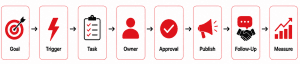
The goal explains why the workflow exists. For example, the goal might be to respond to every new lead within one business day, publish one optimized blog per week, improve Google Ads performance, or request reviews after completed projects. The goal keeps the workflow connected to a business result instead of becoming a checklist for its own sake.
The trigger is what starts the workflow. A trigger could be a new form submission, a scheduled campaign launch date, a new blog topic, a completed service, a monthly reporting date, or a prospect downloading a lead magnet. monday.com identifies triggers as one of the core components of a workflow because they tell the system or team when the next action should begin.
The task list explains what happens from start to finish. Each task should be specific enough that someone can complete it without asking for extra instructions. “Post on social” is vague. “Create one LinkedIn post from the approved blog and schedule it for Thursday morning” is clearer.
Ownership and deadlines make the workflow accountable. Every step should have one owner and a realistic due date. Approval steps should also be defined so the team knows who reviews copy, design, offers, landing pages, ads, or reports before they go live.
The final piece is measurement. A workflow should include a simple way to evaluate whether the process worked. Google Analytics describes key events as actions that are especially important to business success, and Google Ads uses conversions to help businesses understand and optimize the actions that matter. That same thinking applies to your workflow: define what matters before you try to improve it.
How Do You Create a Marketing Workflow for Small Business Step by Step?
You create a marketing workflow for small business by choosing one important marketing activity, mapping the current process, simplifying the steps, assigning ownership, choosing a tracking system, and reviewing the workflow regularly.
Step 1: Choose One Marketing Activity First
Start with one workflow that affects revenue, leads, or customer relationships. Good starting points include lead follow-up, blog publishing, email newsletter creation, Google Ads review, social media scheduling, review requests, or customer reactivation.
Trying to organize all marketing at once can slow the process down. One workflow gives your team a practical win. Once that workflow becomes routine, you can build the next one.
Step 2: Write Down What Happens Now
Document the current version of the process, even if it is messy. Write down every step that happens from the moment the task begins to the moment it is complete.
For example, if you are mapping a lead follow-up workflow, ask: Where does the lead come from? Who gets notified? Is the lead added to a CRM? Who calls or emails them? How soon does follow-up happen? What happens if they do not respond?
Step 3: Remove Unnecessary Steps
A workflow should make marketing easier, not heavier. Remove steps that do not improve speed, quality, clarity, customer experience, or results.
This is where many small businesses make the workflow more realistic. You may not need three approval rounds. You may not need five content formats for every campaign. You may not need a complicated dashboard if a simple weekly report gives you the answer you need.
Step 4: Assign One Owner Per Step
Each step needs a clear owner. This does not mean one person does all the work. It means one person is responsible for making sure that step moves forward.
For example, the marketing manager may own the weekly campaign review, the business owner may own final approval, the sales lead may own lead follow-up, and the content specialist may own blog drafts.
Step 5: Create a Weekly Marketing Rhythm
A workflow becomes easier to follow when it is tied to the calendar. Instead of hoping marketing happens, give each recurring task a place in the week.
For example, Monday can be for planning, Tuesday for content creation, Wednesday for review, Thursday for publishing, and Friday for reporting and follow-up. The rhythm does not need to be perfect. It just needs to be repeatable.
Step 6: Use One Simple Tracking System
Choose one place where the workflow lives. For a very small team, that might be a spreadsheet. For a growing team, it might be a project board, CRM, Airtable base, Asana project, Trello board, Notion page, ClickUp list, or monday.com board.
The tool matters less than the clarity of the process. A simple tool used consistently is better than a sophisticated tool the team ignores.
Step 7: Review and Improve the Workflow Monthly
A workflow should improve over time. Look at what got delayed, what got skipped, what caused confusion, and what created results.
This review does not need to be long. A 30-minute monthly check can reveal whether your workflow needs fewer steps, clearer deadlines, better templates, or stronger automation.
Which Marketing Workflows Should a Small Business Build First?
A small business should build the marketing workflows that most directly affect leads, sales, and customer relationships first. The best starting workflow is usually the one that prevents missed opportunities.
A lead capture workflow is one of the most valuable places to start. This workflow defines what happens when someone fills out a form, calls the business, books a consultation, sends a message, or downloads a resource. It should include where the lead is stored, who gets notified, how quickly the lead is contacted, and what message is sent first.
A lead follow-up workflow is equally important. Many small businesses spend money to generate leads but do not have a reliable system for responding to them. A workflow can define the first call, first email, second follow-up, reminder task, proposal step, and close-lost or nurture step.
A content publishing workflow helps businesses stay visible. This workflow can cover topic selection, keyword research, outline approval, writing, editing, design, publishing, internal linking, email promotion, social sharing, and performance review. Search Engine Journal’s content calendar guidance also emphasizes the role of planning tools in supporting consistent content creation.
A paid ads review workflow is essential for businesses investing in PPC. Google Ads provides recommendations and an optimization score that can be reviewed at campaign, account, and manager account levels. A small business should not blindly apply every recommendation, but a weekly or biweekly review workflow helps make campaign performance a routine decision instead of an occasional reaction.
An email marketing workflow helps new leads and existing customers receive timely communication. Mailchimp explains that marketing automation flows can add tags, send targeted emails, and complete other tasks for contacts based on triggers, actions, and rules.
A review and referral workflow can also support local trust. Google Business Profile allows verified businesses to reply to reviews, and Google notes that helpful replies can show customers that the business is responsive. A review workflow might include requesting a review after project completion, replying to reviews weekly, and flagging reviews that violate policies.
How Can You Keep Your Marketing Workflow Simple Enough to Follow?
You can keep your marketing workflow simple enough to follow by making it small, visible, scheduled, and tied to one clear business outcome. The easier the workflow is to understand at a glance, the more likely your team is to use it.
A practical rule is the 3S framework: simple, scheduled, and specific. Simple means the workflow has only the steps it truly needs. Scheduled means the work has a regular place on the calendar. Specific means every task has a clear owner, due date, and definition of done.
For example, “work on marketing” is not specific. “Review Google Ads search terms every Friday and mark irrelevant queries for exclusion” is specific. “Create content” is not specific. “Draft one blog section from the approved outline by Wednesday at noon” is specific.
Templates also make workflows easier to repeat. A blog template, ad review checklist, email brief, campaign launch checklist, or reporting format removes the need to start from scratch. The less mental effort required to begin, the more likely the task is to happen.
Small businesses should also avoid over-measuring. Too many metrics can create confusion. Start with the few numbers that connect directly to the goal: leads, conversion rate, cost per lead, response time, booked calls, revenue influenced, or tasks completed on time.
When Should You Automate a Marketing Workflow?
You should automate a marketing workflow only after the manual version is clear, repeatable, and useful. Automation works best when it supports a proven process, not when it tries to fix a process no one understands.
Good automation candidates include welcome emails, lead notifications, appointment reminders, CRM updates, review request reminders, internal task creation, abandoned cart emails, monthly reporting reminders, and simple nurture sequences. HubSpot explains that workflow automation can send emails, create follow-ups, update CRM data, and trigger integrations when specific conditions are met.
However, not every marketing task should be automated. Strategy, creative direction, offer development, sensitive customer replies, sales conversations, and final approvals usually need human judgment. monday.com also makes a useful distinction: a workflow is the strategic blueprint, while automation executes specific steps inside that blueprint.
A broken manual process usually becomes a broken automated process. If leads are poorly qualified, automation may simply send irrelevant messages faster. If the offer is unclear, automation will not make it more persuasive. If the CRM data is messy, automation may spread that mess across more systems.
Start with one small automation. For example, when a contact form is submitted, send an internal notification, create a CRM task, and send a confirmation email to the lead. Once that works reliably, you can add more steps, such as lead scoring, segmentation, or a nurture sequence.
What Tools Can Help Manage a Small Business Marketing Workflow?
The best tool for managing a small business marketing workflow is the one your team will actually use consistently. A simple spreadsheet can outperform advanced software if it keeps the team aligned and accountable.
A spreadsheet is often enough for very small teams. It can track campaigns, tasks, owners, deadlines, status, channels, and results. This is a good starting point when the team needs visibility but does not yet need automation or complex collaboration.
A project management board helps when work moves through stages. For example, content can move from idea to brief, draft, review, design, publish, and promote. Airtable notes that workflows can be visualized through spreadsheets, Gantt charts, Kanban boards, and other formats, depending on how the team prefers to work.
A CRM is useful when the workflow involves leads, deals, follow-ups, and customer relationships. It gives the business a central place to see who contacted the company, what stage they are in, and what needs to happen next.
An email platform is useful for welcome sequences, newsletters, lead nurture campaigns, and customer updates. An analytics platform is useful for measuring website actions and campaign performance. Google Analytics allows businesses to mark important actions as key events and use those actions to evaluate performance across channels.
The tool stack should match the workflow’s maturity. Start simple. Add complexity only when the current system creates a real limitation.
What Does a Practical Weekly Marketing Workflow Look Like?
A practical weekly marketing workflow gives each day a clear purpose so the team knows when to plan, create, review, publish, follow up, and measure. This turns marketing into a routine instead of a recurring emergency.
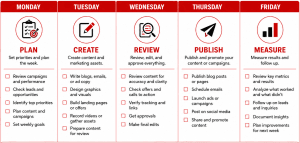
On Monday, review priorities. Look at campaigns, upcoming promotions, current leads, deadlines, ad performance, and the most important marketing task for the week. The goal is not to plan everything. The goal is to decide what matters most now.
On Tuesday, create the assets. This might include drafting a blog, preparing an email, writing ad copy, designing a social graphic, updating a landing page, or building a lead magnet. Creation works best when the brief and goal are already clear.
On Wednesday, review and approve. Check whether the message is accurate, the offer is clear, the call to action is strong, and the tracking is ready. This is also a good day to catch issues before something goes live.
On Thursday, publish and promote. Schedule the email, launch the post, update the website, publish the blog, or activate the campaign. Publishing should not feel rushed because the earlier parts of the workflow already prepared the work.
On Friday, measure and follow up. Review leads, conversions, campaign performance, customer responses, and unfinished tasks. Google Ads conversion data can help businesses understand which keywords, ads, and campaigns are driving valuable actions, while internal follow-up data can show whether those leads are being handled properly.
How Do You Measure Whether Your Marketing Workflow Is Working?
You measure whether your marketing workflow is working by looking at consistency, speed, quality, follow-up, and business results. A workflow is successful when it helps the team complete the right tasks more reliably and improve outcomes over time.
Operational metrics show whether the workflow is being followed. These include tasks completed on time, workflow completion time, skipped steps, delayed approvals, bottlenecks, and rework. monday.com recommends measuring workflow performance with indicators such as cycle time, bottleneck frequency, error rates, and resource utilization.
Marketing metrics show whether the workflow is producing useful outcomes. These might include website visits, form submissions, booked calls, email engagement, cost per lead, conversion rate, sales-qualified leads, review volume, referral inquiries, or revenue influenced.
For PPC, measurement should focus on business actions, not just clicks. Google Ads allows businesses to define valuable actions such as purchases, sign-ups, and phone calls, then use those conversions to evaluate campaign performance.
For broader marketing, Google Analytics key events can help identify important actions across channels such as organic search, email, social, and paid campaigns. This makes it easier to understand not only whether marketing activity happened, but whether it helped users take meaningful steps.
A workflow review should answer three simple questions: What got done? What got stuck? What produced results? Those answers help the business simplify, improve, or automate the right parts of the process.
What Mistakes Should Small Businesses Avoid When Building a Marketing Workflow?
Small businesses should avoid building workflows that are too complicated, tool-dependent, unclear, or disconnected from business priorities. A workflow should support execution, not create another layer of confusion.
The first mistake is starting with software instead of process. Tools can help, but they cannot decide your goals, offers, follow-up rules, approval standards, or success metrics. Define the process first, then choose the tool that fits it.
The second mistake is building too many workflows at once. A small team does not need a complete marketing operations system on day one. It needs one reliable workflow that solves a real problem. Lead follow-up, PPC review, content publishing, or email nurture are usually better starting points than a broad, complex system.
The third mistake is skipping ownership. If no one owns a step, the workflow depends on luck. Every recurring task needs a person responsible for moving it forward.
The fourth mistake is automating too early. Automation should come after clarity. HubSpot recommends starting small with workflows, proving what works, and then layering on more automation over time.
The fifth mistake is failing to update the workflow. Marketing channels, offers, customer behavior, team capacity, and business goals change. A workflow that worked six months ago may need to be simplified, expanded, or replaced.
FAQ
What is the difference between a marketing workflow and a marketing strategy?
A marketing strategy explains the direction of your marketing, while a marketing workflow explains how the work gets done. Strategy covers your audience, positioning, offer, goals, and channels. Workflow covers tasks, owners, deadlines, approvals, publishing, follow-up, and measurement.
A small business needs both. Strategy without workflow creates ideas that do not get executed. Workflow without strategy creates activity that may not support growth.
How many marketing workflows does a small business need?
A small business should start with one to three core workflows. The most useful starting points are usually lead follow-up, content publishing, and campaign review.
As the business grows, it can add workflows for email nurture, review requests, referrals, social media, landing page creation, customer reactivation, and reporting. The goal is not to build more workflows for the sake of it. The goal is to systematize the tasks that matter most.
What is the easiest marketing workflow to start with?
The easiest marketing workflow to start with is usually lead follow-up. It is simple, directly tied to revenue, and easy to measure.
A basic version can include five steps: new lead comes in, owner is notified, lead is added to the CRM or tracker, first response is sent, and follow-up is scheduled. Even this simple workflow can prevent missed opportunities.
Do small businesses need marketing automation software?
Small businesses do not always need marketing automation software at the beginning. They need a clear process first.
Automation software becomes useful when the same task happens repeatedly and the manual version is already working. Examples include welcome emails, internal lead notifications, appointment reminders, CRM task creation, and review request reminders.
How often should a marketing workflow be reviewed?
A small business should review active marketing workflows at least once per month. High-volume workflows, such as PPC campaigns or lead follow-up, may need weekly review.
The review should focus on what got delayed, what created results, and what needs to be simplified. A workflow should evolve as the business learns.
Can a marketing workflow improve PPC results?
Yes, a marketing workflow can improve PPC results by making campaign review, tracking, landing page updates, lead response, and reporting part of a consistent routine.
Paid ads do not end when someone clicks. The workflow after the click matters. If conversion tracking is set up, leads are followed up quickly, and campaign performance is reviewed regularly, PPC decisions become more reliable. Google Ads emphasizes that conversion measurement helps businesses see which keywords, ads, and campaigns are driving valuable actions.
Who should own the marketing workflow in a small business?
The workflow should be owned by the person responsible for marketing outcomes. In some small businesses, that is the owner. In others, it is a marketing manager, operations lead, agency partner, or sales and marketing coordinator.
Each individual step can have its own owner, but one person should be responsible for keeping the overall workflow clear, updated, and connected to business goals.
Conclusion
A marketing workflow does not need to be complicated to be effective. For a small business, the best workflow is the one the team can actually repeat. It should make the next step clear, reduce missed opportunities, and connect marketing activity to measurable business outcomes.
Start with one high-impact process. Document what happens now, remove unnecessary steps, assign ownership, schedule the work, choose a simple tracking system, and review the results. Once that workflow becomes routine, build the next one.
The businesses that stick with marketing are usually not the ones with the most complex systems. They are the ones with clear routines, realistic expectations, and a process that helps them show up consistently.
Why QBall Digital Is Your Ideal Choice for Marketing Workflow for Small Business?
QBall Digital helps small businesses turn scattered marketing tasks into clear, repeatable systems that support growth. Instead of treating marketing as separate campaigns, QBall Digital helps connect strategy, execution, paid ads, content, follow-up, and reporting into one practical workflow.
With the right workflow in place, small businesses can stop guessing what to do next and start making more confident marketing decisions. QBall Digital brings the structure, digital marketing experience, and performance-focused mindset needed to create workflows that are simple enough to follow and strong enough to support long-term results.
QBall Digital also understands that small businesses need systems that fit real capacity. A workflow should not overwhelm the team or create unnecessary admin. It should help the business focus on the marketing actions that generate leads, improve visibility, and turn interest into measurable opportunities.
Build a Marketing Workflow That Works With QBall Digital
Ready to create a marketing workflow your team can actually stick to? QBall Digital can help you organize your marketing tasks, strengthen your lead follow-up, improve campaign visibility, and build a repeatable process that supports better results.
Connect with QBall Digital to build a practical, conversion-focused marketing workflow designed for your small business.