

Sales enablement content for small business helps your sales process close faster by giving prospects the right information at the right moment. Instead of making your team repeatedly explain pricing, process, value, proof, and next steps from scratch, sales enablement content turns your marketing assets into practical sales tools. These tools help reps answer questions, handle objections, build trust, follow up quickly, and guide leads toward a decision.
For a small business, this does not mean building a huge enterprise content library. It means creating a focused set of assets your team can actually use: one-pagers, FAQs, case studies, email templates, sales scripts, proposal support, objection-handling guides, and PPC follow-up content. The goal is simple: make every lead easier to understand, every conversation more consistent, and every follow-up more persuasive.
This is especially important when your business invests in paid ads or digital marketing. Google Ads emphasizes that ads and landing pages should be relevant, clear, and action-oriented; the same continuity should carry into the sales conversation after a lead converts. If someone clicks an ad, reads a landing page, and fills out a form, your sales team should already know what message brought that person in and what content will help them move forward.
What is sales enablement content?
Sales enablement content is any internal or customer-facing asset that helps sales teams communicate value, answer buyer questions, and move prospects closer to a purchase. It gives salespeople the information, proof, and structure they need to have better conversations.
For small businesses, sales enablement content usually falls into two categories. Internal content helps the sales team sell more effectively. This includes call scripts, discovery questions, objection responses, buyer personas, email templates, competitor notes, and playbooks. External content helps buyers understand and trust the offer. This includes case studies, service pages, blog posts, product or service guides, testimonials, explainer videos, FAQs, one-pagers, and proposal materials.
Docebo defines sales enablement content as content sales professionals use to present a product’s value and address users’ needs and pain points. It also separates internal sales content, such as playbooks and scripts, from external content, such as case studies, whitepapers, demos, one-pagers, testimonials, and blog posts.
For a small business, the best sales enablement content is practical, not complicated. It should answer the questions buyers already ask, help your team explain the offer clearly, and make follow-up easier after every call, form fill, or PPC conversion.
What are examples of sales enablement content?
Examples of sales enablement content include sales scripts, email templates, one-pagers, FAQs, case studies, testimonials, battlecards, buyer personas, demos, proposal assets, and follow-up sequences. The best examples are tied to real sales conversations, not created just because another company has them.
Common internal examples include:
| Internal Sales Enablement Content | How It Helps Sales |
|---|---|
| Sales scripts | Keeps messaging consistent during calls |
| Email templates | Speeds up follow-up and nurture |
| Objection-handling guides | Helps reps respond to price, timing, trust, and urgency concerns |
| Sales playbooks | Shows reps what to say, send, and do at each stage |
| Buyer personas | Helps reps tailor messaging to different customer types |
| Battlecards | Prepares reps for competitor comparisons |
| Discovery questions | Helps reps uncover pain points and fit |
Common external examples include:
| External Sales Enablement Content | How It Helps Buyers |
|---|---|
| Case studies | Shows proof and real-world outcomes |
| Testimonials | Builds trust and credibility |
| One-pagers | Explains the offer quickly |
| FAQs | Answers common concerns before they become blockers |
| Blog posts | Educates buyers and supports follow-up |
| Demo videos | Shows how a product, service, or process works |
| Comparison pages | Helps buyers understand why your solution is different |
Atlassian/Loom lists sales scripts, playbooks, email templates, battlecards, buyer persona overviews, blog posts, demos, and explainer videos as common types of sales enablement content. For small businesses, the opportunity is to choose the assets that remove the most friction from active deals instead of trying to create everything at once.
What types of sales enablement content should a small business create first?
A small business should first create the sales enablement content that answers the most common buyer questions and supports the most important sales moments. Start with the assets your team will use every week, not the assets that look impressive but rarely influence a deal.
The first asset should be a one-page offer summary. This should explain what you do, who it is for, what problem it solves, what is included, how the process works, and what the next step is. It gives prospects a simple explanation they can review after a call or share with another decision-maker.
The second asset should be a sales FAQ or objection-handling guide. This should cover pricing, timelines, deliverables, onboarding, reporting, expected results, guarantees, and common hesitations. If your team answers the same question more than a few times, it belongs in this document.
The third asset should be a case study or proof asset. A small business does not need a long enterprise case study to build trust. A concise before-and-after story with the customer’s challenge, your solution, and the result can be enough to help buyers feel more confident.
The fourth asset should be a follow-up email sequence. This should include a post-call recap, proposal follow-up, no-response follow-up, objection response, and educational nurture email. These templates help your team respond faster while keeping messaging consistent.
The fifth asset should be a basic sales playbook. This gives your team a simple process for qualifying leads, running discovery, sending the right content, handling objections, and moving prospects to the next step.
How do you create sales enablement content for a small business?
You create sales enablement content for a small business by starting with real buyer questions, auditing existing marketing assets, and turning the best content into sales-ready tools. The process should be lean, practical, and directly connected to revenue conversations.
Start by collecting questions from sales calls, emails, form submissions, chat messages, CRM notes, proposal feedback, and customer service conversations. Look for repeated friction. Are buyers confused about pricing? Do they ask how long results take? Do they hesitate because they are comparing competitors? Do they need proof before signing? These questions show you what content to create first.
Next, audit what already exists. Most small businesses already have useful material in service pages, landing pages, blog posts, ad copy, presentations, proposals, testimonials, and email campaigns. The issue is that this content may not be packaged for sales use. A blog post may need to become a two-paragraph follow-up email. A service page may become a one-page sales sheet. A testimonial may become a proof section inside a proposal.
Content Marketing Institute’s 2025 B2B research highlights that many marketers still struggle with scalable content creation models, which makes repurposing especially useful for smaller teams. Instead of constantly creating new assets, small businesses can get more value from existing content by adapting it for the sales process.
A practical creation workflow looks like this:
- Identify the top five sales questions or objections.
- Match each question to an existing content asset.
- Rewrite the asset in a shorter, sales-ready format.
- Add proof, examples, and a clear next step.
- Store the asset where sales can find it.
- Review whether reps use it and whether buyers engage with it.
The goal is not to create more content. The goal is to create content that makes sales conversations easier, clearer, and more persuasive.
What is a sales enablement content strategy?
A sales enablement content strategy is the plan for what content sales needs, when reps should use it, where it should live, how it should be updated, and how its performance should be measured. It connects content creation to the actual sales process.
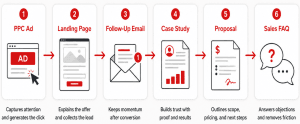
A strong strategy answers several practical questions. What questions do buyers ask at each stage? What content helps them move forward? Which assets should sales send after a PPC conversion, discovery call, proposal, or objection? Who owns each asset? How often is it reviewed? How will the business know whether the content is helping deals close?
Highspot defines a sales enablement content strategy as a coordinated effort across teams such as content marketing, sales, customer success, and product to decide why content should be created, what should be created, and how success should be measured.
For small businesses, the strategy does not need to be complex. A simple content map is often enough:
| Sales Moment | Buyer Need | Content to Use |
|---|---|---|
| New lead | Understand relevance | Landing page, intro email, service overview |
| Discovery call | Clarify needs | Discovery questions, buyer persona notes |
| Consideration | Compare options | FAQ, case study, comparison content |
| Proposal | Justify investment | Proof points, testimonial, ROI explanation |
| Objection | Reduce hesitation | Objection guide, relevant case study |
| Follow-up | Rebuild momentum | Nurture email, recap, next-step content |
What are the best sales enablement tools for small businesses?
The best sales enablement tools for small businesses are tools that help teams manage leads, organize content, automate follow-up, create sales assets, and track engagement without adding unnecessary complexity. Small businesses should choose tools based on workflow, budget, team size, and how easy the tools are to maintain.
A CRM is usually the foundation. HubSpot offers CRM and sales software designed to centralize customer data, manage sales activity, and support follow-up. Pipedrive focuses on pipeline management, deal tracking, sales automation, and integrations for sales teams. Zoho CRM positions its small-business CRM around lead management, automation, and customer relationship management.
For content organization, small businesses can use Google Drive, Notion, or a CRM content library. Google Workspace provides shared drives for storing and sharing team files, while Notion offers sales and CRM templates for tracking leads, managing customer relationships, and organizing sales work.
For video, Loom can help teams create quick sales explainers, walkthroughs, and personalized outreach videos. Loom describes its sales use case as helping teams personalize outreach, connect with prospects, improve efficiency, and speed up the sales cycle.
For sales design assets, Canva can be useful for one-pagers, sales presentations, proposals, and visual pitch materials. Canva offers sales presentation templates and a Sales Work Kit designed for pitching and closing.
A practical small-business stack might include:
| Need | Tool Type | Example Tools |
|---|---|---|
| Lead and deal tracking | CRM | HubSpot, Pipedrive, Zoho CRM |
| Content storage | Shared workspace | Google Drive, Notion, CRM library |
| Follow-up automation | Email/CRM automation | HubSpot, Mailchimp, CRM sequences |
| Sales videos | Async video | Loom |
| Sales collateral design | Design templates | Canva |
| Reporting | CRM and ad reporting | Google Ads, CRM dashboards |
The best tool is not the one with the longest feature list. It is the one your team will actually use consistently.
What should be included in a sales enablement playbook?
A sales enablement playbook should include the process, messaging, content, questions, objection responses, and next steps your team needs to sell consistently. It should act as a practical guide for how to move a buyer from first conversation to closed deal.
A strong small-business playbook should include:
| Playbook Section | What It Should Cover |
|---|---|
| Ideal customer profile | Who your best-fit customers are |
| Buyer personas | Common goals, pain points, objections, and decision factors |
| Lead qualification criteria | What makes a lead worth pursuing |
| Discovery questions | What reps should ask during early calls |
| Core messaging | How to explain your value clearly |
| Offer summary | What is included, how it works, and why it matters |
| Objection handling | How to respond to price, timing, trust, and urgency concerns |
| Content map | Which asset to send at each sales stage |
| Follow-up templates | Emails for post-call, proposal, no-response, and nurture |
| Proposal guidance | What proof, scope, and next steps to include |
| Measurement notes | What metrics reps and managers should track |
Docebo identifies sales playbooks as internal sales enablement content that helps sales professionals handle different situations and challenging scenarios. For a small business, the playbook should be short enough to use and specific enough to guide real conversations.
The playbook should also include PPC lead context when relevant. If a prospect came from a specific campaign, keyword theme, landing page, or lead form, the rep should know how to continue that conversation. Google Ads lead form integrations can send lead data into a CRM through a webhook, which helps businesses connect lead capture with sales follow-up.
How do small businesses organize sales enablement content?
Small businesses organize sales enablement content best when they make it easy for sales reps to find the right asset in the middle of a real conversation. The structure should follow how salespeople search, not how marketing teams internally categorize files.
Start with a simple shared library. This can be a CRM folder, Google Drive, Notion page, or project management workspace. Create folders by sales use case, not just content format. For example, “pricing objections,” “PPC lead follow-up,” “case studies,” “proposal support,” “email templates,” and “competitor comparisons” are more useful than broad folders like “PDFs” or “marketing materials.”
Highspot recommends getting the sales and marketing content “container” under control and creating a single source of truth so reps are not relying on personal folders, outdated files, or old assets. SiftHub also emphasizes that content organization should match how sellers actually search, such as by buyer challenge, sales stage, use case, industry, company size, region, or sales stage.
A clean small-business content library might look like this:
| Folder | Example Assets |
|---|---|
| 01. Sales Scripts | Call openers, discovery scripts, voicemail scripts |
| 02. Email Templates | Post-call, proposal, no-response, nurture emails |
| 03. FAQs and Objections | Pricing, timeline, trust, urgency, comparison responses |
| 04. Case Studies and Testimonials | Customer stories, proof points, reviews |
| 05. Service One-Pagers | Offer summaries, process guides |
| 06. PPC Lead Follow-Up | Campaign-specific emails, landing page FAQs |
| 07. Proposal Support | Proof blocks, scope explanations, ROI notes |
| 08. Competitive Notes | Comparison points, positioning guidance |
Every asset should have a clear file name, owner, last updated date, and note explaining when to use it. A good rule: if a rep cannot find the asset in less than one minute, the system needs to be simplified.
How do you measure sales enablement content performance?
You measure sales enablement content performance by tracking whether sales reps use the content, buyers engage with it, and deals move forward more efficiently. Website traffic alone is not enough because enablement content is often designed for active prospects, not broad awareness.
Start with internal usage metrics. Track which assets reps open, download, send, or reference during deals. If an important asset is not being used, the issue may be visibility, quality, relevance, or lack of training.
Next, track buyer engagement. This includes email clicks, video views, content downloads, proposal views, form submissions, and time spent on key assets. These signals show whether prospects are interacting with the content your team sends.
Then connect content to sales outcomes. Useful metrics include lead-to-call rate, call-to-proposal rate, proposal-to-close rate, sales cycle length, win rate, average deal size, response rate, and cost per closed customer. Highspot recommends measuring content performance through internal engagement, external engagement, and impact on revenue.
For PPC-driven small businesses, measurement should go beyond the initial form fill. Google Ads offline conversion imports can help advertisers connect ad interactions with later offline outcomes, such as qualified leads or closed sales. This matters because a campaign that generates cheap leads is not necessarily profitable if those leads do not become customers.
The key question is not “Did this content get views?” The better question is “Did this content help the right buyer take the next step?”
Sales enablement content vs marketing content: what’s the difference?
The difference between sales enablement content and marketing content is that marketing content attracts and educates potential buyers, while sales enablement content helps convert active prospects into customers. They overlap, but they are not used in the same way.
Marketing content usually supports visibility, awareness, traffic, engagement, and lead generation. Examples include blog posts, social posts, SEO pages, PPC landing pages, newsletters, and educational guides. Sales enablement content supports sales conversations, follow-up, objection handling, proposal support, and buyer decision-making.
Docebo explains that content marketing is generally designed to attract potential leads, while sales enablement content supports sales interactions and helps customers move through the buyer journey. It also notes that content marketing is often measured by metrics like traffic or subscribers, while sales enablement is measured by outcomes such as closed deals, win rate, lead conversion rate, quota attainment, or sales cycle length.
A blog post can become sales enablement content when a rep sends it after a discovery call to answer a specific question. A landing page can become sales enablement content when its messaging becomes the basis for the follow-up email. A testimonial can become sales enablement content when it is placed in a proposal to reduce trust concerns.
For QBall Digital’s audience, this distinction matters because PPC and sales should not operate separately. The message that earns the click should support the conversation that closes the customer.
FAQ
Can blog posts be used as sales enablement content?
Yes. Blog posts can be used as sales enablement content when they answer real buyer questions during the sales process. A rep can send a relevant article after a call, use it to explain a concept, or repurpose it into an email sequence.
How often should sales enablement content be updated?
Important sales enablement content should be reviewed at least quarterly. Pricing, service details, case studies, testimonials, proposal materials, and competitor notes should be updated whenever information changes.
Who should create sales enablement content in a small business?
Sales and marketing should create it together. Sales provides real buyer questions, objections, and deal feedback. Marketing turns those insights into clear, polished assets that reps can use consistently.
Does a small business need sales enablement software?
Not always. A small business can start with a CRM, shared folder, email templates, and a simple content map. Dedicated sales enablement software becomes more useful when the team grows, content volume increases, or tracking content engagement becomes harder manually.
Conclusion
Sales enablement content for small business is not about creating more content just to fill a folder. It is about giving your sales team the right information, proof, language, and follow-up tools to help buyers make decisions faster.
The most effective approach starts with real sales friction. What do buyers ask before they commit? Where do deals slow down? Which objections repeat? Which leads need more education after converting from PPC? Once those questions are clear, your business can turn existing marketing content into one-pagers, FAQs, case studies, email templates, sales scripts, playbooks, and proposal support.
Small businesses do not need a massive enablement department to benefit from this. They need a practical system: create the highest-impact assets first, organize them around the sales process, train the team to use them, and measure whether they help leads move closer to becoming customers.
Why QBall Digital is Your Ideal Choice for Sales Enablement Content?
QBall Digital helps small businesses connect marketing content with real sales outcomes. Instead of treating PPC campaigns, landing pages, blogs, emails, and sales conversations as separate activities, QBall Digital helps align them into one clearer buyer journey. That means your sales team gets content that supports actual conversations, not generic assets that sit unused.
For small businesses investing in digital marketing, every lead has a cost and every follow-up matters. QBall Digital understands how to turn campaign messaging, buyer questions, landing page content, and sales insights into assets that help prospects move forward. With the right sales enablement content, your team can respond faster, explain value more clearly, and close with more confidence.
Turn More Leads Into Customers With QBall Digital
Your marketing content should do more than attract clicks. It should help your sales process close faster, follow up smarter, and convert more of the right buyers.
Partner with QBall Digital to build sales enablement content that supports your team from first click to final decision.