
Google Analytics 4 can feel overwhelming for business owners because it does far more than count website visits. It tracks user actions, traffic sources, engagement, purchases, landing page performance, campaign paths, and important business outcomes. That depth is valuable, but only when you know which reports deserve your attention.
The goal is not to check every chart in GA4. The goal is to understand which reports help you answer practical business questions: Where are leads coming from? Which pages are wasting paid traffic? Which campaigns produce revenue? Which channels look busy but do not create meaningful results?
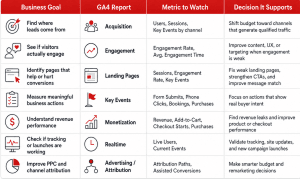
For most business owners, the reports that matter most are Acquisition, Engagement, Landing Pages, Key Events, Monetization, Realtime, and Advertising. These reports show how people find your business, what they do after arriving, and whether your marketing activity is producing outcomes that matter.
What is Google Analytics 4, and why should business owners care?
Google Analytics 4 is Google’s analytics platform for measuring how people find, interact with, and convert on your website or app. It helps business owners understand user behavior, marketing performance, and important actions such as form submissions, phone clicks, bookings, sign-ups, and purchases.
The major difference between GA4 and older versions of Google Analytics is that GA4 is built around events. Instead of only focusing on sessions and pageviews, GA4 measures actions people take. A page view is an event. A button click can be an event. A purchase, form submission, scroll, video play, or checkout step can also be measured as an event.
That matters because business growth is not created by traffic alone. A website can receive thousands of visits and still produce weak sales results. GA4 helps reveal whether those visits are turning into engagement, leads, revenue, or other valuable actions.
For business owners, GA4 is useful because it connects marketing activity to business questions. You can see whether organic search is attracting new visitors, whether paid search traffic is converting, whether social media visitors are engaging, and whether ecommerce customers are completing purchases. Google explains that Analytics reports are designed to help users monitor traffic, investigate data, and understand users and their activity. Some data appears automatically after setup, while other data requires additional configuration.
That last point is important. GA4 is only as useful as its setup. If your important actions are not tracked correctly, your reports may show traffic but fail to show whether that traffic has business value.
Which GA4 reports actually matter most for business owners?
The GA4 reports that matter most for business owners are the ones connected to decisions. In most cases, that means Acquisition reports, Engagement reports, Landing Pages, Key Events, Monetization reports, Realtime, and Advertising or attribution reports.
A lead generation business should focus heavily on Acquisition, Landing Pages, Engagement, and Key Events. These reports show which channels bring potential customers, which pages introduce people to the business, and whether visitors take valuable actions such as submitting a form, clicking a phone number, booking a consultation, or requesting a quote.
An ecommerce business should pay close attention to Monetization, Ecommerce Purchases, Landing Pages, Acquisition, and checkout-related events. These reports help identify which products sell, where shoppers drop off, and which channels generate revenue.
A service business should use User Acquisition, Traffic Acquisition, Engagement, Landing Pages, and Key Events to understand where prospects come from and how they behave before contacting the company. For example, a service business may discover that organic search brings more visitors, but paid search produces more quote requests.
A business investing in PPC should prioritize Traffic Acquisition, Advertising, Landing Pages, and Key Events. These reports help determine whether campaigns are producing valuable outcomes or simply buying clicks.
The best way to think about GA4 is simple: every important report should support a business decision. If a report does not help you decide whether to increase budget, fix a page, improve an offer, adjust targeting, or refine messaging, it may not need weekly attention.
What does the Acquisition report tell you about your marketing performance?
The Acquisition report tells you where your website or app visitors come from. It helps business owners understand whether people are arriving through organic search, paid search, direct visits, referrals, email, social media, or other marketing channels.
There are two acquisition reports business owners should understand: User Acquisition and Traffic Acquisition. The User Acquisition report focuses on how new users first found your website or app, while the Traffic Acquisition report focuses on where new and returning users’ sessions came from. Google describes the Traffic Acquisition report as a pre-made detail report that helps you understand where website and app visitors are coming from, including both new and returning users. Google also notes that the User Acquisition report is specifically designed to show how new users found your website or app for the first time.
This distinction matters because a customer may first discover your business through organic search, then return later through a paid ad, email, or direct visit. Looking only at one view can give you an incomplete picture of how your marketing works.
Business owners should avoid judging channels by traffic volume alone. A channel that brings fewer visitors may still be more profitable if those visitors submit forms, book appointments, or make purchases. A channel with high traffic but low engagement or few Key Events may need better targeting, stronger landing pages, or a clearer offer.
The most useful Acquisition metrics include users, new users, sessions, engagement rate, Key Events, and revenue or lead completions by channel. For PPC-focused businesses, this report is especially important because it helps separate paid traffic that looks active from paid traffic that actually supports growth.
For example, paid search may bring fewer visitors than organic search, but those visitors may convert at a much higher rate because they are searching with stronger commercial intent. Social media may bring many visitors but low engagement if the audience is too broad. Email may bring fewer sessions but stronger repeat engagement because subscribers already know the brand.
Use Acquisition reports to decide which channels deserve more investment, which channels need better campaign targeting, and which traffic sources should be paired with stronger conversion paths.
How should business owners use the Engagement report?
Business owners should use the Engagement report to understand whether visitors are interacting with the website after they arrive. Traffic tells you that people reached your site. Engagement helps show whether they found something relevant enough to stay, view content, and take action.
GA4 engagement is more useful than looking at raw visits alone because it adds behavioral context. If a landing page receives many sessions but very little engagement, the issue may be poor message match, slow loading, weak mobile experience, confusing content, or traffic from the wrong audience.
Important engagement metrics include engagement rate, average engagement time, views, event count, and event count per user. These numbers help show whether users are actively consuming content or leaving without meaningful interaction.
A high engagement rate can suggest that visitors are finding your page relevant. A low engagement rate can suggest that the page does not match user intent, the traffic source is weak, or the page experience needs improvement. However, engagement should never be interpreted in isolation. A short engagement time on a contact page may still be positive if users quickly click to call or submit a form.
The Pages and Screens report is also useful here because it shows data about the pages and screens people visit, whether they are the first page in a session or a later page. Google recommends using the Landing Page report instead when you specifically want to see the first page someone landed on.
For business owners, the value of the Engagement report is diagnostic. It helps answer questions like: Are visitors reading our service pages? Are blog readers moving toward commercial pages? Are PPC visitors interacting with the landing page? Are product page visitors showing enough interest to continue?
Use Engagement reports to identify whether your website experience is helping or weakening your marketing investment.
Why are Key Events one of the most important GA4 metrics?
Key Events are one of the most important GA4 metrics because they measure actions that are especially important to your business. A Key Event might be a purchase, form submission, phone click, booking request, quote request, demo request, trial signup, file download, or other meaningful action.
Google defines a Key Event as an event that measures an action particularly important to the success of your business. When a user performs that action, GA4 records it and surfaces it in reports. Google also notes that any event you collect can become a Key Event once you identify or create the event and mark it as important.
This is where GA4 becomes commercially useful. Without Key Events, a business owner may see traffic and engagement but still not know whether the website is generating leads, sales opportunities, bookings, or revenue actions. Key Events separate meaningful performance from vanity metrics.
For a local service business, Key Events might include phone clicks, contact form submissions, appointment bookings, or quote requests. For a B2B company, they may include demo requests, consultation forms, pricing page interactions, and gated resource downloads. For ecommerce, they may include add to cart, begin checkout, and purchase. For SaaS businesses, they may include free trial signups, product demo requests, account creation, and pricing page interactions.
The mistake many businesses make is marking too many actions as Key Events. Not every click deserves that status. A newsletter signup may matter, but it should not be treated the same as a high-intent consultation request unless it has proven business value.
A practical approach is to choose three to five Key Events that represent meaningful business outcomes. These should be actions that indicate real buyer intent or direct revenue potential. Once those are tracked correctly, every other report becomes easier to interpret because you can judge traffic, channels, pages, and campaigns based on business impact.
Use Key Events to answer the most important analytics question: Did this activity create something valuable for the business?
How can the Landing Pages report reveal which pages make or lose money?
The Landing Pages report shows which pages visitors first land on when they enter your website and how those pages perform. This report is especially important because the first page often shapes the user’s impression, next action, and likelihood of converting.
Google describes the Landing Page report as a pre-made detail report that helps you understand how visitors interact with your website by showing the first page a visitor lands on and how many visitors land on each page. Google also notes that this can help identify which pages perform well and which need improvement.
For business owners, this report is critical because every marketing channel sends people somewhere. SEO sends visitors to blog posts, service pages, and product pages. PPC campaigns send traffic to dedicated landing pages or existing website pages. Email campaigns send subscribers to offers, announcements, or resource pages. Social campaigns send visitors to content or promotions.
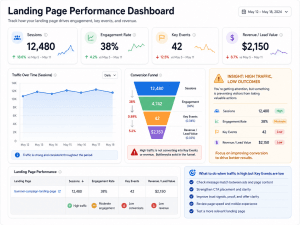
The most useful Landing Pages metrics include sessions, engagement rate, average engagement time, Key Events, revenue, and conversion-related actions. If a page receives high sessions but low engagement, the content may not match the traffic source. If a PPC landing page receives traffic but few Key Events, the ad may be overpromising, the page may be unclear, or the offer may not be compelling enough.
A page can lose money quietly. For example, a paid search campaign may send expensive traffic to a generic homepage when users need a specific service page. A product campaign may send shoppers to a page with weak product information. A consultation campaign may send users to a page where the contact form is buried too far down.
The Landing Pages report helps reveal these problems. A page with high traffic and low Key Events may need stronger CTA placement, clearer messaging, better proof, testimonials, pricing clarity, FAQs, faster load speed, or a more relevant offer. A page with strong engagement but weak conversion may need a more obvious next step.
For PPC-focused business owners, this is one of the most valuable reports in GA4. It shows whether paid traffic is being sent to pages that can actually convert attention into business outcomes.
What Monetization reports matter for ecommerce and revenue-focused businesses?
Monetization reports matter for businesses that sell products, subscriptions, services, digital goods, or app-based revenue online. These reports help business owners understand what customers buy, which products perform best, and where shoppers may be dropping out of the buying process.
Google explains that the Ecommerce Purchases report is a pre-made detail report showing information about the products or services sold through an ecommerce store. Google also notes that ecommerce measurement helps businesses collect and analyze data about how customers interact with an ecommerce store, although ecommerce events need to be set up on the website or app.
Important ecommerce and monetization metrics include total revenue, purchase revenue, ecommerce purchases, items purchased, add-to-cart events, checkout events, first-time purchasers, and average purchase revenue per user. These metrics help business owners move beyond traffic and understand buying behavior.
A basic ecommerce funnel might include product views, add-to-cart actions, checkout starts, and purchases. Product views show interest. Add-to-cart actions show stronger intent. Checkout starts show commitment. Purchases show completed revenue.
When those steps are tracked properly, Monetization reports can reveal revenue leaks. If many users view a product but few add it to cart, the product page may need better images, clearer descriptions, stronger pricing, reviews, or trust signals. If many users add items to cart but few start checkout, shipping cost, delivery expectations, or cart usability may be the issue. If many users begin checkout but few purchase, payment friction or unexpected costs may be creating abandonment.
Product-level reporting can also support inventory, merchandising, and promotional decisions. If a product gets high views but low purchase activity, it may need better positioning or pricing. If a product sells well through one channel but not another, the audience or campaign message may need refinement.
Use Monetization reports to understand where revenue is created, where buyers drop off, and which products or campaigns deserve more attention.
When should business owners use the Realtime report?
Business owners should use the Realtime report for quick checks, launches, and troubleshooting. It is useful for seeing what is happening right now, but it should not be the main report for strategic decisions.
The Realtime report is helpful when you want to confirm that GA4 is receiving data after a tracking update, form change, campaign launch, or website deployment. Google specifically mentions Realtime as one of the tools available to check whether Analytics is recording Key Events.
For example, after setting up a phone click event, you can click the phone number on your site and check Realtime to see whether the event appears. After launching a new ad campaign, you can use Realtime to confirm that users are arriving. After updating a form, you can test a submission and confirm that the correct event is being recorded.
However, Realtime data can lead to overreaction. It shows immediate activity, not long-term trends. A quiet hour does not mean a campaign failed. A sudden spike does not mean a campaign is profitable. Business owners should use Realtime for validation, not final analysis.
The difference is simple: Realtime is for monitoring and testing. Acquisition, Landing Pages, Key Events, Monetization, and Advertising reports are for business decisions.
How do GA4 Advertising and attribution reports help with PPC decisions?
GA4 Advertising and attribution reports help business owners understand how different channels and touchpoints contribute to important actions. This is especially useful for PPC because the customer journey often includes more than one click, visit, or channel.
Google explains that the Advertising section in GA4 helps users gain insight into important user journeys, understand ROI across channels, make budget allocation decisions, and evaluate attribution models. Google defines attribution as assigning credit to different ads, clicks, and factors along a user’s path to completing a meaningful action.
This matters because last-click thinking can distort performance. A user might first discover your business through a Google Search ad, return through organic search, read a comparison page, and later convert after clicking a remarketing ad. If you only look at the final click, you may undervalue the earlier touchpoints that helped create the conversion.
In GA4, business owners can review attribution paths and attribution models under the Advertising section. Google states that Attribution reports can be accessed by clicking Advertising and then Attribution models or Attribution paths. Google’s data-driven attribution model distributes credit for Key Events based on account data rather than relying only on a fixed rule.
For PPC-focused businesses, these reports can help answer important questions. Which campaigns drive Key Events? Which channels assist conversions? Are paid ads introducing users who convert later through another channel? Are landing pages converting paid traffic efficiently? Are certain campaigns producing traffic but no valuable actions?
GA4 attribution is not perfect, and it should not be treated as an exact financial truth. It is best used as directional evidence. Business owners should combine GA4 data with Google Ads, CRM data, call tracking, lead quality, and sales outcomes where possible.
Use Advertising and attribution reports to make smarter budget decisions, refine campaigns, improve remarketing, and understand the role paid media plays in the full customer journey.
Which GA4 metrics should business owners avoid overvaluing?
Business owners should avoid overvaluing metrics that look impressive but do not prove business impact. These are often called vanity metrics, and they can lead to poor marketing decisions when viewed alone.
Users can be misleading if they are not paired with engagement or Key Events. A campaign that drives many users but few valuable actions may be attracting the wrong audience. Pageviews can be misleading if users are not taking the next step. Event count can be misleading if the events are low-value actions. Revenue can even be misleading if profit margin, return rate, or customer acquisition cost are ignored.
Average engagement time also needs context. A long engagement time on a blog post may be positive if the content supports education and lead nurturing. A long engagement time on a checkout page may suggest confusion. A short engagement time on a contact page may be positive if users quickly click to call.
The better approach is to pair metrics together. Instead of looking at users alone, review users, engagement rate, and Key Events. Instead of looking at landing page sessions alone, review sessions, engagement, and conversion actions. Instead of looking at traffic by channel alone, review traffic, cost, Key Events, and lead quality. For ecommerce, compare product views, add-to-cart activity, checkout starts, and purchases.
GA4 becomes more useful when business owners stop asking, “Did traffic go up?” and start asking, “Did the right traffic take the right action?”
How can business owners build a simple weekly GA4 reporting routine?
Business owners can build a simple GA4 routine by reviewing a small set of reports weekly and saving deeper analysis for monthly or quarterly reviews. The goal is to create consistent visibility without turning analytics into a time-consuming distraction.
Weekly GA4 check
A weekly check should focus on movement and obvious issues. Review Acquisition to see which channels drove traffic and Key Events. Check Landing Pages to identify pages with major gains or losses. Review Key Events to see whether leads, bookings, purchases, or other meaningful actions changed. Use Engagement reports to check whether priority pages are holding attention.
Realtime should only be part of the weekly routine when you are testing tracking, launching campaigns, or checking a recent site change.
Monthly GA4 review
A monthly review should go deeper. Compare channel performance over time. Look at landing page conversion trends. Evaluate campaign performance. Review your lead funnel or ecommerce funnel. Check whether Key Events are still aligned with business goals. Identify two or three optimization actions for the next month.
For example, a monthly review might reveal that paid search leads increased, but landing page engagement dropped. That could trigger a review of ad copy, keyword intent, and landing page messaging. Another review might show that organic traffic increased but Key Events did not, suggesting the content strategy is attracting informational visitors who are not moving toward commercial pages.
Quarterly GA4 review
A quarterly review should focus on strategy and measurement quality. Revisit business goals. Clean up unnecessary events. Review attribution assumptions. Check whether reports are still aligned with your sales process. Improve dashboards. Compare GA4 insights with CRM or sales data.
This is also a good time to ask whether your GA4 setup reflects the way your business actually makes money. If your business depends on qualified consultation requests, but GA4 only tracks generic pageviews and clicks, your reporting system is not complete.
A good GA4 routine should create decisions, not just reports.
How should business owners connect GA4 reports to real business decisions?
Business owners should connect GA4 reports to decisions by pairing each report with a specific business question. GA4 is most valuable when it tells you what to improve, where to invest, and what to stop doing.
If the question is, “Where should we spend more?” use Acquisition, Advertising, and Key Events. These reports can show which channels and campaigns are producing valuable actions.
If the question is, “Which pages need improvement?” use Landing Pages and Engagement. These reports can show which entry pages attract traffic but fail to keep users engaged or drive action.
If the question is, “Why are sales dropping?” use Monetization reports, ecommerce events, checkout events, and traffic source data. These can help identify whether the issue is traffic quality, product interest, checkout friction, or campaign performance.
If the question is, “Are ads producing real leads?” use Advertising, Traffic Acquisition, Landing Pages, Key Events, and CRM data. GA4 can show whether ads are creating tracked actions, while CRM or sales data can help confirm whether those actions became qualified opportunities.
If the question is, “Which content supports revenue?” use Pages and Screens, Landing Pages, Key Events, and assisted journey insights. A blog post may not create an immediate lead, but it may introduce users who later return and convert.
The practical value of GA4 comes from action. Weak landing page data can lead to stronger CTAs, clearer offers, better testimonials, or dedicated PPC pages. Poor campaign data can lead to budget shifts. Strong engagement data can guide content expansion. Ecommerce drop-off data can lead to checkout improvements.
GA4 does not replace business judgment. It improves business judgment by showing patterns that are difficult to see from intuition alone.
What are the most common GA4 reporting mistakes business owners make?
The most common GA4 reporting mistakes are tracking too much, failing to define Key Events, ignoring campaign tagging, and reading reports without business context.
One major mistake is not setting up Key Events. Without Key Events, business owners may see traffic trends but miss the actions that matter most. Another mistake is marking too many events as important. When every interaction is treated as a success, reporting becomes noisy and less useful.
Another common issue is relying only on default reports without customizing GA4 to match business goals. Google notes that reports and report collections can vary depending on setup and can be customized, which means two businesses may not see the same navigation or report layout.
Campaign tagging is another frequent problem. If UTM parameters are inconsistent, GA4 may split similar campaign traffic into messy or misleading categories. For example, “PaidSocial,” “paid-social,” and “paidsocial” may create reporting confusion if naming conventions are not standardized.
Business owners also make mistakes when they compare GA4 numbers directly to older Universal Analytics data. GA4 uses a different measurement model, so numbers may not match exactly. Treat GA4 as a new measurement system rather than a direct continuation of old reports.
Other mistakes include ignoring internal traffic, failing to link Google Ads, not connecting Search Console where relevant, tracking clicks that do not matter, ignoring lead quality, and making decisions from short timeframes.
The most dangerous mistake is looking at traffic without asking whether that traffic created business value.
FAQ
Is Google Analytics 4 useful for small business owners?
Yes. Google Analytics 4 is useful for small business owners because it shows how people find the website, which pages they visit, and whether they take valuable actions such as submitting forms, calling, booking appointments, signing up, or purchasing.
Small business owners do not need to study every report. They need a focused view of the reports tied to traffic quality, engagement, leads, sales, and campaign performance.
What is the most important GA4 report for business owners?
The most important GA4 report depends on the business goal. For most businesses, Acquisition, Landing Pages, Key Events, and Engagement are the most useful starting points.
For ecommerce businesses, Monetization and Ecommerce Purchases are also essential. For businesses investing in PPC, Advertising and attribution reports become especially important.
What are Key Events in GA4?
Key Events are important user actions that a business chooses to track as meaningful outcomes. Examples include form submissions, purchases, phone clicks, quote requests, bookings, sign-ups, and demo requests.
They matter because they help business owners measure actions connected to leads, sales, and revenue instead of only tracking traffic or pageviews.
How often should business owners check GA4?
Most business owners should check GA4 weekly for high-level performance and monthly for deeper analysis. Weekly checks should focus on traffic sources, Key Events, landing pages, and engagement. Monthly reviews should focus on trends, campaign performance, funnel issues, and optimization priorities.
Campaign launches, tracking updates, and website changes may require more frequent checks.
Can GA4 show which ads generate leads?
Yes, GA4 can help show which ads generate leads when Google Ads is linked properly and Key Events are configured. This allows business owners to see how paid traffic contributes to important actions.
For stronger lead quality analysis, GA4 should be combined with CRM data, sales feedback, or call tracking. A form submission is useful, but the real business question is whether that lead became qualified or profitable.
Why do GA4 numbers look different from old Google Analytics reports?
GA4 numbers can look different because GA4 uses an event-based measurement model, while Universal Analytics used a session-based model. Because the systems collect and organize data differently, some numbers will not match exactly.
Business owners should avoid treating GA4 as a direct copy of Universal Analytics. It is better to build new reporting habits around GA4’s event-based structure.
Conclusion
Business owners do not need to master every GA4 report. They need to know which reports connect directly to traffic quality, customer behavior, leads, revenue, and marketing decisions.
The most useful reports are Acquisition, Engagement, Landing Pages, Key Events, Monetization, Realtime, and Advertising. Acquisition shows where users come from. Engagement shows whether they interact. Landing Pages show whether entry pages are helping or hurting results. Key Events show whether meaningful business actions are happening. Monetization shows revenue performance. Realtime helps with testing. Advertising and attribution reports support smarter PPC and budget decisions.
The best GA4 setup is not the one with the most data. It is the one that clearly shows what is working, what is wasting budget, and where your next growth opportunity is.
Why QBall Digital is Your Ideal Choice for Google Analytics 4 for Business Owners?
QBall Digital helps business owners turn GA4 from a confusing dashboard into a practical decision-making system. Instead of overwhelming you with every available metric, QBall Digital focuses on the reports, Key Events, and campaign insights that connect directly to leads, revenue, and marketing ROI.
With experience across analytics, paid media, and conversion-focused strategy, QBall Digital can help ensure your GA4 setup reflects how your business actually grows. From tracking form submissions and phone clicks to analyzing PPC landing pages and revenue funnels, QBall Digital gives you clearer visibility into what is driving results and what needs improvement.
QBall Digital also understands that analytics should support action, not just reporting. By connecting GA4 insights with campaign strategy, landing page performance, and business objectives, QBall Digital helps you make smarter decisions about where to spend, what to improve, and how to convert more of your traffic into measurable growth.
Make GA4 Work Harder for Your Business with QBall Digital
Stop guessing which campaigns, pages, and channels are worth your budget. Partner with QBall Digital to build a GA4 reporting setup that helps you make smarter marketing decisions, improve campaign performance, and grow with confidence.