
Small business websites have to earn confidence quickly. Visitors may like your service, need your product, or be ready to request a quote, but hesitation appears the moment they wonder, “Is this business real?”, “Can I trust them with my information?”, or “Will they actually deliver?”
That is where website trust signals for small business become essential. Trust signals are the visible and experience-based credibility cues that reassure visitors your business is legitimate, professional, secure, and capable of helping them. They do not replace a strong offer, but they make that offer easier to believe.
For small businesses, trust signals are not decorative extras. They directly support lead generation, ecommerce sales, consultation bookings, quote requests, and repeat visits by reducing uncertainty at the exact moments when visitors are deciding whether to act.
What are website trust signals for small business?
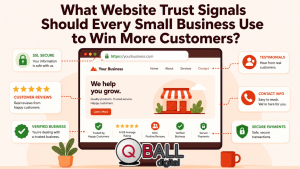
Website trust signals for small business are the elements on a website that help visitors believe the company is real, reliable, safe, and qualified to deliver what it promises. They can include reviews, testimonials, HTTPS security, contact information, professional design, case studies, team photos, certifications, policies, guarantees, and clear next steps.
Some trust signals are visual, such as badges, star ratings, logos, photos, and secure checkout icons. Others are content-based, such as detailed service pages, FAQs, case studies, privacy policies, and helpful educational content. A third category comes from the user experience itself: fast loading, mobile-friendly pages, simple navigation, working forms, and clear calls to action.
Small businesses need these signals because they often do not have the instant recognition that larger brands enjoy. A national brand can rely partly on familiarity. A local service provider, boutique ecommerce store, consultant, clinic, agency, or home service business has to prove credibility in real time. Stanford’s web credibility guidelines emphasize making it easy to verify information, showing that a real organization stands behind the site, highlighting expertise, making contact easy, and keeping content updated.
The goal is simple: remove doubt before it blocks action. A visitor who feels confident is more likely to call, submit a form, book an appointment, request a quote, or complete a purchase.
Why do trust signals matter so much for small business websites?
Trust signals matter because visitors make credibility judgments quickly, often before they read every word on the page. Nielsen Norman Group identifies design quality, upfront disclosure, comprehensive and current content, and connection to the rest of the web as major credibility factors in web design.
A polished website alone is not enough. Visitors also need proof. They want to see that other people have worked with the business, that the business can be contacted, that claims are supported, and that personal or payment information will be handled responsibly.
For service businesses, trust signals reduce the risk of making the wrong hire. For ecommerce businesses, they reduce concerns about payment security, product quality, shipping, and returns. For professional services, they help visitors evaluate expertise, confidentiality, and reliability before starting a conversation.
Trust signals also support conversion rate optimization. A visitor may not consciously say, “I need a trust signal here,” but they may hesitate if a form has no privacy reassurance, a service page has no proof of results, or a checkout page lacks payment security indicators. Google also recommends using HTTPS for better user and site security and notes that HTTP sites can be marked “not secure” in Chrome.
What trust signals should every small business website include?
Every small business website should include a core set of trust builders that prove legitimacy, safety, professionalism, and customer satisfaction. The exact mix depends on the business model, but most small business websites need the following elements.
Clear contact information
Clear contact details are one of the simplest and strongest trust signals. A website should make it easy to find a phone number, email address, contact form, business hours, service area, and physical location where relevant.
This matters because hidden contact information creates friction. Visitors may wonder whether the business is active, responsive, or accountable. Stanford’s credibility guidelines specifically recommend making contact information clear, including phone number, physical address, and email address.
Small businesses should place contact details in predictable areas: the header, footer, contact page, local landing pages, and near major calls to action. For service businesses, a short line such as “Response within one business day” can also reassure visitors who are unsure what happens after they submit a form.
HTTPS and secure browsing
HTTPS is now a baseline expectation. Even if a small business does not sell products online, visitors may still submit names, phone numbers, emails, project details, addresses, or other sensitive information through forms.
Google recommends HTTPS instead of HTTP to improve user and site security. It also notes that websites using HTTP can be marked “not secure” in Chrome, which can damage confidence before the visitor even engages with the page.
A secure site should also use properly functioning forms, reputable payment providers if payments are accepted, and clear privacy language. The goal is not to overwhelm visitors with technical details. It is to show that the business treats security as a basic responsibility.
Real reviews and testimonials
Reviews and testimonials help visitors see that other people have trusted the business before them. They are especially powerful for small businesses because they transfer credibility from past customers to future customers.
BrightLocal’s Local Consumer Review Survey tracks how consumers find, read, and interact with business reviews, making reviews a major credibility factor for local and small businesses.
The strongest testimonials are specific. Instead of “Great service,” a useful testimonial explains what the customer needed, what the business did, and what changed afterward. When permission allows, include the customer’s name, company, role, city, photo, or industry. Reviews from third-party platforms can be even more persuasive because they are not controlled entirely by the business.
Professional design and consistent branding
Design affects trust before visitors read the details. A cluttered, outdated, slow, or broken website can make a capable business look unreliable.
Nielsen Norman Group notes that design quality remains one of the key factors users rely on when assessing trustworthiness online. Stanford’s guidelines also recommend designing a site so it looks professional or appropriate for its purpose, with attention to layout, typography, images, and consistency.
Professional design does not mean the website has to be flashy. In many cases, clarity builds more confidence than complexity. A trustworthy small business website should have readable fonts, clear navigation, consistent colors, real imagery where possible, working links, and mobile-friendly layouts.
About page with real people
An About page gives visitors a human reason to trust the business. It should show who is behind the company, why the business exists, what experience the team brings, and how the company helps customers.
This is especially important for small businesses because many customers want to know who they are dealing with before making contact. Stanford’s guidelines recommend showing that honest and trustworthy people stand behind the site, including real people, bios, and personal details where appropriate.
Strong About pages often include founder stories, team photos, credentials, values, community involvement, and a plain-language explanation of the company’s approach. The page should feel authentic, not generic.
Policies and legal pages
Policies reduce uncertainty. Depending on the business, these may include a privacy policy, terms and conditions, refund policy, return policy, shipping policy, cancellation policy, warranty information, or service agreement details.
For ecommerce businesses, these pages help customers understand what happens after purchase. For service businesses, they clarify boundaries, expectations, and responsibilities. For any business collecting personal information, a privacy policy helps visitors understand how their data is handled.
These pages should be easy to find, especially in the footer and near relevant decision points. A return policy should not be buried during checkout. A privacy reassurance should not be missing below a lead form.
Portfolio, case studies, or work examples
A portfolio or case study section helps visitors evaluate capability before they speak to the business. This is especially important for agencies, contractors, designers, consultants, photographers, builders, coaches, and B2B service providers.
A basic portfolio shows what the business has done. A stronger case study explains the problem, process, solution, and result. Even when exact numbers are unavailable, a good case study can show the business’s thinking, communication style, and ability to solve real problems.
For small businesses, proof of work often does more than a generic sales claim. Instead of saying “We deliver excellent results,” show a project, explain the challenge, and describe the outcome.
Awards, certifications, memberships, and partner badges
Awards, certifications, memberships, and partner badges can build trust when they are relevant and verifiable. They are especially useful in industries where expertise, compliance, technical ability, or safety matters.
Examples include professional licenses, platform certifications, chamber of commerce memberships, industry association badges, insurance details, security certifications, or authorized partner badges. These signals should link to verification pages where possible or include a short explanation of what they mean.
The key is relevance. Too many badges can create visual clutter, and unverifiable badges can make the site feel less credible. Trust signals should support the visitor’s decision, not distract from it.
Transparent pricing or clear next-step expectations
Not every small business can publish exact pricing, especially when services are customized. But every business can reduce pricing uncertainty.
Options include starting prices, package ranges, “request a custom quote” explanations, consultation details, what affects cost, or a step-by-step outline of what happens after someone contacts the business. This helps visitors feel oriented instead of exposed to an unknown sales process.
Clear next steps are also trust signals. A visitor is more likely to submit a form when they know whether they will receive a call, email, estimate, proposal, consultation, or booking link.
Active content and updated details
Updated content shows that the business is alive and attentive. Outdated copyright years, old promotions, inactive social links, broken pages, and stale blog posts can create doubt.
Stanford’s credibility guidelines note that people assign more credibility to sites that appear recently updated or reviewed.
Small businesses should periodically review service pages, contact details, team bios, case studies, pricing references, reviews, FAQs, and policy pages. Even small updates can prevent the website from feeling abandoned.
How do trust signals improve conversions on service pages and landing pages?
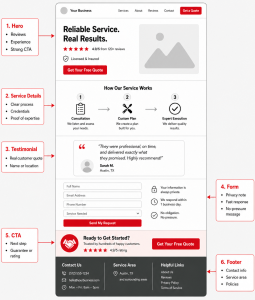
Trust signals improve conversions by reducing uncertainty near the places where visitors decide whether to act. A testimonial buried on a separate page may help, but a testimonial placed beside a quote request form can be more persuasive because it appears at the moment of hesitation.
On a service page, trust signals should support the visitor’s decision journey. The hero section can include a concise value proposition, review rating, years of experience, or client type served. The service explanation can include proof of process, examples, and outcomes. The CTA area can include a testimonial, privacy reassurance, response-time expectation, or “no obligation” message.
Near forms, small reassurance copy can make a difference. For example, “We’ll only use your details to respond to your enquiry” helps address privacy concerns. For high-value services, visitors may also need to see credentials, case studies, or consultation details before taking the next step.
Trust signals should be distributed across the page, not dumped into one “Why trust us?” section. Visitors do not move through a website with perfect attention. Repeating relevant proof at decision points helps keep confidence high.
How can small businesses use reviews and testimonials without making them look fake?
Small businesses can make reviews and testimonials feel authentic by using specific, verifiable, current customer feedback. The more generic a testimonial sounds, the less persuasive it becomes.
A strong testimonial usually includes a real problem, a clear experience, and a specific result. For example, “They redesigned our booking page and made it easier for patients to schedule online” is more credible than “Amazing company!” Specificity helps visitors picture the outcome.
Third-party reviews should be used honestly. Google Business Profile allows businesses to read and reply to reviews, and it also provides a way to flag reviews that violate policies. Responding to reviews, including negative ones, can also show that the business listens and takes accountability.
Businesses should avoid fake reviews, copied testimonials, review gating, or exaggerated claims. The FTC provides guidance for endorsements, influencers, and reviews, including compliance considerations for consumer reviews and testimonials.
The best places for testimonials include homepages, service pages, landing pages, contact pages, pricing sections, and checkout flows. Match the testimonial to the page. A review about fast response time belongs near a contact form. A review about product quality belongs near the product or category page.
What website security and privacy signals build confidence?
The most important website security and privacy signals are HTTPS, secure forms, trusted payment options, privacy policies, transparent data use, and clear checkout or enquiry reassurance.
Security signals matter because visitors are often being asked to share something: contact details, payment information, business problems, addresses, project budgets, or personal preferences. If the website looks unsafe, the visitor may leave even if they like the offer.
For ecommerce sites, payment-related trust signals should appear near payment fields, checkout buttons, and order review sections. Baymard Institute’s checkout research focuses on how users perceive security during checkout and how visual security cues influence confidence in payment forms.
For lead generation sites, the same principle applies to forms. Avoid asking for more information than necessary. Explain what happens after submission. Add a privacy note. Make sure the form works smoothly on mobile.
Small businesses should also avoid displaying security badges or certifications they have not earned. A fake or irrelevant trust badge can backfire because it makes the business look careless or misleading.
How does website design affect trust before visitors read the content?
Website design shapes the first credibility impression. Before visitors evaluate testimonials, policies, or service details, they notice whether the site feels professional, organized, current, and easy to use.
Trustworthy design is usually clear rather than complicated. Visitors should be able to understand what the business does, who it helps, where it operates, and how to take the next step without confusion. Navigation should be simple. Buttons should be obvious. Text should be readable. Pages should work well on mobile.
Google notes that page experience matters and that fast pages usually beat slow pages in user satisfaction. It also points site owners to Core Web Vitals and PageSpeed Insights for performance evaluation.
Design trust also depends on consistency. If the homepage looks modern but the contact page is broken, confidence drops. If brand colors, voice, imagery, and spacing change from page to page, the site may feel patched together. A small business website should feel like one coherent experience.
Real imagery can also help. Stock photos are not automatically bad, but overused or unrealistic images can make a local business feel generic. Real team photos, work examples, office photos, product photos, and project images often build stronger confidence.
Which trust signals matter most for different types of small businesses?
The best trust signals depend on what the visitor is worried about. A homeowner hiring a contractor has different concerns from a shopper buying online or a business owner choosing a marketing agency.
Local service businesses
Local service businesses should prioritize reviews, location details, service areas, before-and-after photos, team photos, licenses, insurance information, guarantees, and response-time expectations.
Visitors want to know whether the business is nearby, responsive, and capable of doing the work safely. Examples, photos, and local reviews can make the business feel more real.
Professional services
Professional service businesses should emphasize credentials, bios, certifications, confidentiality, consultation process, case studies, thought leadership, and client outcomes.
For accountants, consultants, legal professionals, financial advisors, agencies, and similar businesses, expertise is a major trust driver. Visitors need confidence that the provider understands their problem and can handle sensitive or high-value work.
Ecommerce businesses
Ecommerce websites should highlight secure checkout, payment options, return policies, shipping details, product reviews, guarantees, product photos, and transparent pricing.
Online shoppers often hesitate because they cannot physically inspect the product. Detailed product pages, clear policies, and visible support options reduce that risk.
B2B small businesses
B2B websites should use client logos, case studies, industry experience, process explanations, measurable results, testimonials, and consultation CTAs.
B2B buyers are often comparing multiple vendors. They need proof that the business understands their industry, communicates professionally, and can support a longer decision process.
Appointment-based businesses
Appointment-based businesses should show practitioner bios, booking clarity, location details, cancellation policies, reviews, FAQs, reminder processes, and what to expect during the first visit or consultation.
This applies to clinics, salons, studios, coaches, consultants, and other appointment-led businesses. Visitors are more likely to book when the process feels clear and low-risk.
How can small businesses check whether their website is missing trust signals?
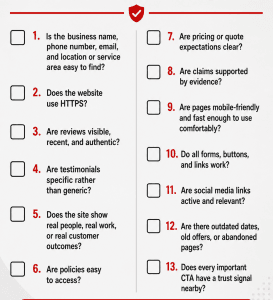
Small businesses can audit trust signals by reviewing the website from the perspective of a skeptical first-time visitor. The question is not “Do we know we are trustworthy?” The question is “Can a new visitor verify that quickly?”
A useful trust audit should check whether the business is easy to contact, whether the site uses HTTPS, whether reviews are current, whether the website shows real people, whether policies are easy to find, and whether claims are supported by proof.
It should also review conversion points. Every major CTA should have some form of reassurance nearby. A contact form may need privacy copy. A service page may need a testimonial. A pricing section may need a “what happens next” explanation. A checkout page may need payment security cues and return details.
Here is a practical checklist:
How should trust signals be measured after adding them to a website?
Trust signals should be measured by looking at whether visitors engage more confidently and convert more often. The goal is not just to add badges, reviews, and policies. The goal is to improve business results.
Key metrics include conversion rate, contact form submissions, phone clicks, quote requests, booking completions, checkout abandonment, CTA click-through rate, bounce rate, time on page, scroll depth, and repeat visits.
Heatmaps and session recordings can also help reveal where visitors hesitate. For example, if many users stop at a pricing section, the page may need clearer pricing guidance, proof, or FAQ support. If users start but do not complete a form, the form may be too long or may need privacy reassurance.
Customer feedback is also valuable. Ask new customers what made them feel confident enough to reach out or buy. Their answers often reveal which trust signals matter most in the real decision process.
Where traffic volume allows, A/B testing can compare different placements. A testimonial near a form, a review score in the hero section, or clearer policy language may improve results, but the best placement depends on the audience and page type.
What common mistakes make trust signals less effective?
Trust signals become less effective when they look fake, outdated, irrelevant, hidden, or disconnected from the visitor’s concern. A badge or testimonial only works when it answers a real doubt.
One common mistake is using vague testimonials. “Great company” does not explain why the customer trusted the business or what outcome they received. Another mistake is hiding reviews on a separate page instead of placing them near service descriptions, CTAs, or checkout steps.
Outdated information is another credibility problem. Old copyright years, expired promotions, broken social links, missing team members, and stale blog posts can make visitors wonder whether the business is still active.
Businesses should also avoid unsupported claims such as “best,” “number one,” or “most trusted” unless they can prove them. Google’s helpful content guidance encourages content created to benefit people, not content created primarily to manipulate search performance. That same principle applies to trust signals: they should help visitors make informed decisions, not pressure them with empty claims.
Too many trust badges can also weaken credibility. A page crowded with logos, seals, and generic icons may look less professional than a page with fewer, more relevant proof points. Trust signals should feel intentional.
How can QBall Digital help small businesses build more trustworthy websites?
QBall Digital can help small businesses turn trust into a practical website strategy, not just a design detail. A trustworthy website needs the right structure, messaging, proof, technical foundation, and conversion flow working together.
For small businesses, this means building pages that answer real visitor doubts. QBall Digital can help position reviews, testimonials, case studies, service explanations, CTAs, and contact details in places where they support action. Instead of treating trust signals as a checklist, the website can be designed around how real customers evaluate risk.
QBall Digital can also support the technical side of credibility. Mobile responsiveness, performance, secure browsing, clean navigation, working forms, and consistent branding all affect whether a visitor feels comfortable taking the next step.
For businesses investing in lead generation, trust-focused web design can make PPC and SEO traffic more valuable. When visitors arrive from paid campaigns or organic search, the website must quickly prove that the business is relevant, legitimate, and worth contacting.
FAQ
What are the most important website trust signals for small business?
The most important trust signals are clear contact information, HTTPS, real reviews, testimonials, professional design, privacy policies, service or product details, case studies, credentials, real photos, and clear calls to action. These signals help visitors verify that the business is legitimate and safe to contact or buy from.
Do trust signals help small business websites get more leads?
Yes. Trust signals can help generate more leads by reducing doubt near important conversion points. When visitors see reviews, proof of work, clear contact details, secure forms, and helpful explanations, they are more likely to call, book, request a quote, or submit an enquiry.
Where should trust signals appear on a website?
Trust signals should appear above the fold, near CTA buttons, beside contact forms, on service pages, on product pages, during checkout, on the contact page, and in the footer. They work best when placed near the visitor’s decision point rather than hidden on one separate page.
Are reviews better than testimonials?
Reviews are often more trusted because they usually appear on third-party platforms, while testimonials are selected by the business. However, testimonials are still useful when they are specific, permission-based, and connected to real customer outcomes.
Does every small business need HTTPS?
Yes. HTTPS is a basic website security expectation. Google recommends HTTPS for better user and site security, and HTTP pages may be marked “not secure” in Chrome.
Can too many trust badges hurt credibility?
Yes. Too many trust badges can make a page look cluttered or suspicious, especially if the badges are generic, irrelevant, or unverifiable. It is better to use fewer trust signals that directly support the visitor’s decision.
How often should a small business update its trust signals?
A small business should review trust signals at least quarterly. Updates may include adding new reviews, refreshing testimonials, replacing outdated team information, checking policy pages, updating case studies, testing forms, and removing expired offers or broken links.
Conclusion
Trust signals are not just small design details. They are credibility builders that help visitors feel confident enough to take action. For small businesses, that confidence can be the difference between a lost visitor and a qualified lead, booking, sale, or long-term customer.
The strongest websites combine multiple trust signals across the full customer journey. Reviews, HTTPS, contact details, professional design, policies, case studies, real photos, and clear CTAs all work together to answer the visitor’s hidden concerns. When those signals appear near decision points, they help turn interest into action.
Why QBall Digital is Your Ideal Choice for Website Trust Signals?
QBall Digital understands that a small business website has to do more than look professional. It has to reassure visitors, answer objections, and guide them toward taking the next step. By combining strategic design, clear messaging, technical best practices, and conversion-focused structure, QBall Digital helps businesses create websites that feel credible from the first click.
A trust-focused website is especially important when businesses rely on PPC, SEO, local search, or referral traffic. Every visitor arrives with questions, and every page should help answer them. QBall Digital can help small businesses place the right trust signals in the right locations so visitors feel informed, safe, and ready to act.
QBall Digital also brings a practical growth mindset to website improvement. Instead of adding random badges or generic testimonials, the focus is on building confidence where it matters most: service pages, landing pages, forms, checkout flows, and contact points. That makes trust part of the website’s conversion strategy, not just its visual presentation.
Build a Website Customers Trust with QBall Digital
Ready to make your website more credible, persuasive, and conversion-focused? QBall Digital can help you strengthen the trust signals that matter most, improve the way visitors experience your brand, and turn more website traffic into real business opportunities.