
Many businesses treat their Google Business Profile as a one-time setup task. They verify it, add a few details, maybe upload some photos, and then move on. That approach usually leaves growth on the table. Google Business Profile management works best when it is treated as an ongoing operations task—one that supports visibility in Search and Maps, protects trust, and helps convert local searchers into calls, clicks, and visits. Google says you can edit your verified profile to keep details like hours, contact information, and photos accurate so customers can find and learn more about your business.
For businesses in Indianapolis, that matters because local buyers often make quick decisions based on what they see in your profile at that moment. If your hours are wrong, your photos are outdated, your latest reviews are unanswered, or your posts have gone stale, your profile can still exist without doing much to support growth. Weekly Google Business Profile management helps prevent that drift. It turns your profile from a passive listing into an active local acquisition asset. Google’s performance tools are built around showing how customers find your profile and what actions they take after seeing it, which reinforces that this is something worth managing consistently rather than occasionally.
What is Google Business Profile management?
Google Business Profile management is the ongoing process of keeping your business listing accurate, complete, active, and useful on Google Search and Maps. It includes editing core business information, updating hours, checking categories, managing photos and videos, replying to reviews, publishing posts, monitoring questions, and reviewing performance. Google’s own help documentation centers these tasks as part of maintaining a profile that helps customers find and learn about your business.
In practice, management is broader than simple listing maintenance. It sits at the intersection of local SEO, reputation management, and conversion readiness. A profile with accurate information, strong recent reviews, fresh visual content, and timely updates gives customers more confidence to contact a business. A neglected profile can create hesitation even if the business itself is excellent.
That is why “management” is the right word here. You are not just filling in fields. You are maintaining a customer-facing sales and trust asset inside Google’s ecosystem.
Why is weekly Google Business Profile management important for consistent growth?
Weekly management matters because customer decisions are immediate, but profile quality can slip quietly over time. A change in business hours, a new service, a customer complaint, an outdated photo, or a missed question can all weaken the profile’s ability to convert. Google states that profile edits help customers find and learn more about a business, and its posts feature is meant to share announcements, offers, updates, and event details directly on Search and Maps.
Consistency also helps you catch issues before they become larger problems. Google’s guidelines for representing your business warn that inaccurate or non-compliant information can lead to changes in your information or, in some cases, removal of business information from Google. That means weekly review is not only about growth. It is also about protecting the integrity of the profile.
From an operations standpoint, a weekly rhythm is ideal because it is frequent enough to keep the profile current without becoming burdensome. It gives your team a reliable cadence to verify data, respond to customers, publish something useful, and review performance trends.
What should you check first each week on your Google Business Profile?
The first weekly task should always be a profile accuracy check. Before you think about posting, reviews, or visibility, make sure the foundational information is right. Google explicitly recommends editing your verified Business Profile to keep business information accurate and up to date.
Start by reviewing your business name, address or service area, phone number, website URL, primary category, secondary categories, and business hours. If you have special hours, holiday hours, seasonal availability, or temporary changes, those should be updated promptly. This is one of the simplest ways to reduce customer friction. Someone who sees the wrong hours or outdated contact details is less likely to trust the listing.
Next, review your customer-facing features. Check whether booking links, messaging settings, appointment options, and service details still reflect how your business operates. If you are a service-area business, make sure your service coverage still matches your real delivery area. Google’s representation guidelines emphasize that businesses should reflect themselves accurately and consistently as they are recognized in the real world.
Finally, look for unexpected changes, suggested edits, restrictions, or missing fields. Google’s Profile Strength tool is designed to help you identify missing information such as business description, hours, and contact details, so it can be useful as part of this first weekly pass.
How do you keep your business information accurate and compliant?
Accurate information is the baseline of effective Google Business Profile management. Google’s guidelines tell businesses to represent themselves as they are consistently recognized offline and to follow profile rules to avoid common problems, including unwanted information changes or removals.
That means your business name should match your real-world branding rather than being stuffed with extra keywords. Your category choices should describe what the business actually is, not every possible service you could associate with it. Your address, service area, phone number, and website should connect clearly to the real customer experience. If you change operating hours, add a location, pause a service, or shift service coverage, the profile should be updated as part of normal business operations.
Compliance also extends to your content. Google’s Business Profile policy overview says profile content must accurately represent the location in question and follow the platform’s policies and guidelines. That applies not only to your core details but also to photos, posts, and other information attached to the listing.
For most businesses, the best way to stay compliant is to assign one owner for profile governance. Someone should be responsible every week for checking whether the profile still matches the reality of the business.
How should you manage Google reviews every week?
Review management should be one of the most consistent parts of your weekly process. Google says verified businesses can reply to reviews on their Business Profile, and businesses can flag reviews that violate Google’s content policies.
The first step is simple: read every new review. Positive reviews deserve acknowledgment because they reinforce trust for future searchers. Negative reviews deserve a calm, professional response because they show how your business handles problems. Google’s own review guidance notes that replying to reviews can help build customer trust.
The second step is operational. Do not treat reviews as only a marketing task. Use them as feedback. If several customers mention the same delay, communication issue, or service concern, that is an operations signal. Weekly Google Business Profile management should include passing those patterns to the right internal person so the root issue can be fixed.
The third step is process-driven review generation. You do not need a complicated campaign to improve review flow. What you need is a consistent request habit after a completed service, purchase, or successful customer interaction. Google’s Business Profile resources include options such as shareable review links and QR codes, which support making review requests easier for customers.
A practical weekly review workflow looks like this: check for new reviews, reply to all of them, flag anything policy-violating, note common themes, and make sure your team is still asking satisfied customers for feedback at the right moment.
What should you post on your Google Business Profile each week?
Google says businesses can use posts to share announcements, offers, updates, and event details directly with customers on Search and Maps, and that these updates can help customers decide to visit the business.
That alone is a strong reason to include posting in your weekly checklist. Posts give your profile visible freshness. They also let you control more of the story customers see when they find your business. Instead of leaving the profile to speak only through static business information and customer reviews, you can use posts to highlight what is current, useful, and relevant.
A good weekly posting plan does not need to be elaborate. One useful post per week is often enough for consistency. The best content usually falls into a few practical categories: a service highlight, a recent project or result, a seasonal reminder, a promotion or limited-time offer, an answer to a common customer question, or a company update that strengthens credibility.
For Indianapolis businesses, the most effective posts are usually the ones tied to real customer decisions. A contractor might post a seasonal maintenance reminder. A med spa might post an update about a popular service and expected appointment demand. A law firm might post a timely educational update tied to a common consultation topic. A home services company might post completed work examples with a short explanation of the problem solved.
The key is consistency and relevance. Weekly Google Business Profile management is not about posting just to fill space. It is about giving searchers one more reason to trust that the business is active, attentive, and current.
How often should you add photos and visual updates to your profile?
Google Business Profile visual content should be reviewed every week and refreshed regularly. Google’s help center includes specific resources for managing profile photos and videos, and the Profile Strength tool encourages businesses to add useful content such as photos and videos to improve completeness.
For most businesses, that does not mean uploading new images every single week no matter what. It means checking whether the profile still presents the business well. If your logo is outdated, your cover image feels weak, your newest work is not represented, or customers are mainly seeing older visuals, it is time to refresh the gallery.
The strongest profile photos usually show the business as a real, trustworthy place or service provider. That may include exterior images, interior shots, team photos, product images, completed jobs, before-and-after examples where appropriate, or visuals that help customers know what to expect. Photos should support confidence, not just aesthetics.
Weekly review also helps prevent stale presentation. Businesses evolve faster than their profiles. A new office, updated signage, improved workspace, expanded service offering, or stronger visual brand should appear in the profile instead of being hidden behind old uploads.
How do you monitor Google Business Profile performance week by week?
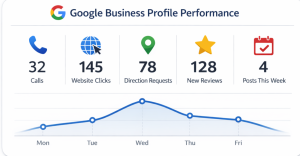
Google’s performance reporting shows how customers find your profile and what actions they take after they see it. Owners and managers can review views, clicks, and other customer interactions for individual or multiple profiles.
That matters because weekly management should not be based on guesswork. You need to know whether your profile activity is supporting actual business actions. In most cases, the most useful weekly metrics are not abstract vanity indicators. They are direct signs of customer intent, such as calls, website clicks, direction requests, and other interactions that suggest real engagement.
Weekly performance review should answer a few questions. Did customer actions rise or fall versus the previous period? Did anything change after a new post, updated photo set, or review response surge? Are customers using Search and Maps in the ways you expect? Are there drops that may signal profile issues, seasonality, or reduced visibility?
If you manage many locations, Google’s Business Profile Performance API can help pull reporting at scale. Google describes it as a way for merchants to fetch performance reports about their Business Profile on Google. That is more relevant for multi-location businesses or agencies, but it reinforces the idea that performance monitoring is part of serious profile management.
The goal of weekly reporting is not to obsess over every fluctuation. It is to build a habit of noticing trends early and tying profile activity to customer behavior.
What does a weekly Google Business Profile management checklist look like?
A strong weekly Google Business Profile management checklist should be simple enough to repeat and thorough enough to catch the issues that affect visibility, trust, and conversion. Google’s own tools support this kind of cadence through profile edits, review management, posts, Profile Strength, and performance reporting.
A practical weekly checklist for an Indianapolis business can look like this:
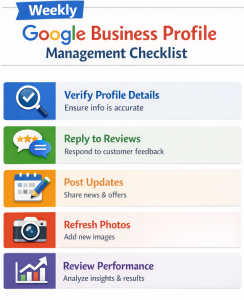
At the beginning of the week, verify all core business details. Check hours, contact information, website links, categories, service areas, and any special updates. Review whether the profile still accurately reflects how the business operates. Look at Profile Strength prompts to catch missing information.
Next, move into customer interaction. Read and respond to all new reviews. Check for new questions or customer-facing issues. If a review points to a service problem, make sure that issue is shared internally rather than handled only with a public reply. Google supports review replies for verified businesses, so there is little reason to leave genuine reviews unanswered week after week.
Then review content freshness. Publish one post if you have not already done so that week. Make it relevant to what customers actually need to know now—an update, an offer, a timely reminder, a featured service, or a useful FAQ-style message. Review photos and add fresh visuals when needed.
Finally, check performance. Review the latest customer interactions, compare trends to the prior period, and note what changed. This does not need to become a long analytics meeting. A short recurring review is enough to keep the profile tied to outcomes rather than activity for its own sake.
What makes this checklist effective is not complexity. It is repetition. Consistent weekly attention is what keeps the profile healthy, persuasive, and useful.
Who should handle Google Business Profile management for a business in Indianapolis?
The right owner depends on the size of the business and how important local search is to lead flow. For some companies, the owner can manage the profile directly if the workload is light and the profile is a priority. For others, an office administrator or in-house marketer may be the natural fit. Multi-location businesses or companies with heavier competition often benefit from agency support because the workflow requires more consistency and deeper troubleshooting.
Google explicitly acknowledges that businesses may work with third parties for Business Profile management and provides guidance for doing so. It notes that some businesses choose outside help when time or expertise is limited.
What matters most is not the title of the person doing the work. It is whether the responsibility is clearly owned. When no one owns the profile, updates become sporadic, reviews sit unanswered, and performance gets ignored. When someone is accountable every week, the profile is much more likely to stay aligned with business goals.
When should a business in Indianapolis hire professional Google Business Profile management help?
A business should consider professional help when the profile is too important to leave unmanaged or too complex to manage casually. That often happens when there are multiple locations, high review volume, frequent operational changes, recurring visibility issues, duplicate or inaccurate information, content restrictions, or internal bandwidth problems.
Professional support also becomes valuable when the business wants the profile to do more than merely exist. Weekly Google Business Profile management can support stronger customer trust, more consistent updates, better review response quality, and more disciplined performance reporting. But those gains usually require a process, not occasional attention.
Google’s third-party guidance reinforces that outside help can be appropriate when businesses need expert advice or hands-on support, as long as responsibilities and policies are handled clearly.
For a business in Indianapolis, that decision often comes down to opportunity cost. If your profile is a meaningful driver of calls, bookings, or local visibility, neglect has a real cost. In that case, professional management is less about outsourcing a listing and more about protecting a growth channel.
FAQ
How many times a week should you update your Google Business Profile?
You should review it at least once a week. That does not mean every field must change weekly, but a weekly check helps you catch inaccurate information, respond to reviews, add timely posts, and confirm that the profile still reflects the business accurately. Google’s help materials emphasize keeping information up to date and using posts, reviews, and performance tools actively.
Can weekly posting improve Google Business Profile visibility?
Weekly posting can improve the freshness and usefulness of your profile for customers. Google says posts help businesses share updates, offers, and event details directly on Search and Maps and help customers decide whether to visit. While Google does not promise a ranking boost for posting frequency alone, regular posting can make the profile more active and persuasive.
How quickly should you respond to Google reviews?
As quickly as your team can respond thoughtfully and professionally. A weekly review process is the minimum, but faster is better when possible. Google allows verified businesses to reply to reviews and notes that replying can help build customer trust.
What happens if Google changes your business information?
Google may update profile information from various sources to keep listings accurate, which is one reason regular review matters. If changes appear that do not reflect your real business details, you should review and correct them promptly. Weekly management helps catch these issues before they confuse customers.
Is Google Business Profile management different for service-area businesses?
Yes. Service-area businesses need to pay especially close attention to how service areas, business details, and customer expectations are represented. The profile should match how the business actually operates, and weekly review is important when coverage areas or availability change. Google’s representation guidelines apply across business types and emphasize accuracy.
Can one team manage multiple Google Business Profiles efficiently?
Yes, but the process needs structure. Google’s performance documentation supports access to performance information for individual or multiple profiles, and its API tools can help businesses manage reporting at scale. For larger organizations, weekly management usually requires a standardized checklist and clear ownership across locations.
Conclusion
A strong Google Business Profile is rarely the result of a single optimization session. It is usually the result of repeated weekly actions that keep the profile accurate, responsive, current, and aligned with how the business really operates. Google’s own tools and guidance point in the same direction: update business information, manage customer reviews, publish posts, maintain visual content, and review performance regularly.
That is why a weekly checklist works so well. It removes guesswork, creates accountability, and turns your Google Business Profile into a managed local growth asset instead of a neglected listing. For businesses in Indianapolis, that kind of consistency can make the difference between a profile that simply exists and one that helps drive qualified local demand.
Why QBall Digital is Your Ideal Choice for Google Business Profile Management?
QBall Digital is built for the kind of disciplined weekly execution that Google Business Profile management actually requires. Instead of treating GBP as a one-time optimization project, QBall Digital can help Indianapolis businesses manage it as an ongoing operations channel—one that supports visibility, trust, and lead generation at the same time. That means checking the details that matter, keeping content current, responding to customer feedback, and making sure the profile reflects the real business accurately week after week.
Just as important, QBall Digital can connect profile activity to business outcomes. A strong management process is not about chasing vanity actions or publishing random updates. It is about maintaining a profile that helps local customers choose your business with confidence. With a weekly checklist-driven approach, QBall Digital can help businesses in Indianapolis build a stronger presence in Search and Maps while reducing the common problems that come from neglect, inconsistency, or unclear ownership.
Ready to Improve Your Google Business Profile Management in Indianapolis with QBall Digital?
If your Google Business Profile has become a set-it-and-forget-it asset, now is the time to change that. QBall Digital can help you build a weekly management process that keeps your profile accurate, active, and aligned with your growth goals.
Whether you need better review management, more consistent posting, cleaner profile governance, or a complete weekly checklist to support local lead generation, QBall Digital can help turn your Business Profile into a stronger marketing and operations asset for your Indianapolis business.