
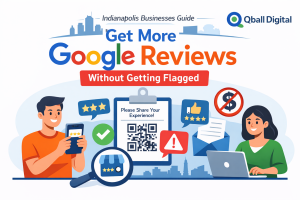
If you’ve ever worried that “asking for more reviews” could backfire—filtered reviews, warnings on your profile, or worse—you’re not overthinking it. Google is explicit: reviews must reflect genuine experiences, and incentivized or fake engagement can trigger removals and Business Profile restrictions.
This guide shows you a repeatable, weekly system to earn more Google reviews the right way—plus what a review generation service Indianapolis should (and shouldn’t) do if you hire one.
What does Google actually allow (and forbid) when you ask for reviews?
You can ask for reviews. Google even provides official guidance and tools (like a shareable review link/QR code) to help you do it.
What matters is how you ask:
Allowed (policy-safe)
- Ask customers to leave a review after a real interaction.
- Send a direct review link or QR code on receipts, in follow-up emails, or after chats.
- Reply publicly to reviews (including negative ones) in a professional, non-promotional way.
- Value honest feedback (a mix of positive and negative can look more trustworthy).
Forbidden / high-risk
- Incentives (discounts, freebies, gift cards, “leave a review for X”). Google calls this “fake engagement” and says it’s strictly prohibited.
- Review gating (filtering who gets asked based on whether they’re likely to leave a positive review). Google policy language is commonly interpreted to prohibit selectively soliciting only positive reviews.
- Fake reviews, employee/family reviews, bulk review manipulation, or anything that’s not rooted in genuine customer experience.
Bottom line: the compliant goal is consistent volume and authenticity, not “manufacturing 5-star ratings.”
What is a review generation service in Indianapolis supposed to do—without crossing policy lines?
A legitimate review generation service isn’t a “rating booster.” It’s an operational system that helps you:
- Ask every appropriate customer consistently (no cherry-picking).
- Send review requests via SMS/email at the right moment.
- Use Google’s official review link or QR code so customers have low friction.
- Set sensible limits (e.g., one reminder, then stop).
- Track performance (requests sent → clicks → reviews posted).
- Help your team ask confidently, with scripts that avoid policy landmines.
What it should not do:
- Offer incentives or “rewards for reviews.”
- Route unhappy customers away from Google (“tell us privately first”), which is review gating in disguise.
- Promise “guaranteed 5-star reviews” or “we remove bad reviews” (huge red flags).
Why do Google reviews move the needle on local visibility and lead quality?
Reviews influence two outcomes that matter most for local businesses:
- Local discovery and competitiveness. Marketing teams consistently cite review quantity, recency, and content as meaningful local visibility drivers, especially in map results where “prominence” is a core concept.
- Conversions (the PPC-friendly part). Star ratings and recent feedback reduce buyer uncertainty. That often means:
- More calls from the same ad budget (higher click confidence)
- Higher conversion rates on landing pages with embedded review proof
- Better lead quality (people who call already trust you)
Even if you’re spending on ads, reviews act like conversion-rate optimization for local—they make the click more likely to become a call.
How do you build a policy-safe review engine that works every week?
Here’s the “set it and run it” system that keeps you compliant and consistent.
1) Choose your review “trigger moments”
Pick 2–3 moments when customers have clearly received value:
- Completed service / delivered result
- Successful appointment close-out
- After a positive support resolution
- At project milestone sign-off (B2B)
2) Use one official review link (or QR code)
Google explicitly supports sharing a link/QR to make reviewing easier.
Make it the single destination for all asks (SMS, email, printed cards, receipts).
3) Standardize the ask (neutral, non-leading)
No star-rating language. No “If you loved us…” framing. Keep it simple:
- “Would you share your experience?”
- “Your feedback helps other customers.”
4) Automate the first ask—and limit follow-ups
A good default:
- Send request within the best timing window (next section).
- If no review, send one reminder.
- Then stop (avoid “nagging” patterns and protect your list health).
5) Track weekly, not “whenever we remember”
Every week, review:
- Requests sent
- Click rate
- Review completion rate
- Reviews gained
- Average rating trend (rolling 30–90 days)
Consistency is what compounds.
When is the best time to ask for a Google review, and what timing hurts results?
The best time is usually right after the customer receives value, while the details are fresh.
Good timing examples:
- Home services: immediately after completion + walkthrough
- Medical/dental: after the appointment ends (if appropriate)
- Professional services: after deliverable acceptance or milestone
Bad timing:
- During an unresolved issue
- When the customer is rushed or mid-conflict
- Long delays that force them to remember details weeks later
If there’s a problem, fix it first—then request feedback once the relationship is stable.
What should your review request say (SMS, email, and in-person) to stay compliant—and get responses?
These templates are designed to be neutral and policy-safe.
SMS template (short + direct)
“Hi [Name]—thanks for choosing us. If you’re willing, could you leave a quick Google review about your experience? [Link]”
SMS reminder (one-time)
“Hi [Name]—quick reminder in case you didn’t see this. Your feedback helps a lot: [Link]”
Email subject lines
- “Quick favor—could you share feedback?”
- “How did we do?”
- “Thanks again—would you leave a review?”
Email template (simple)
Hi [Name],
Thanks again for choosing [Business]. If you have a minute, would you share your experience in a Google review?
[Review Link]
We read every review—thank you.
– [Name], [Role]
In-person script (front desk / technician)
“If you feel we did a good job today, we’d really appreciate a Google review. I can text you a link, or you can scan this QR code when you have a moment.”
Note what’s missing: incentives, “5-star,” or any attempt to steer sentiment.
How can you follow up without annoying customers or getting flagged as spammy?
A follow-up can be helpful when it’s respectful and limited.
Best practices:
- Only 1 reminder (2 total touches max is a safe default for most businesses).
- Include an easy opt-out for SMS.
- Stop immediately once they review (or reply asking you to stop).
Also: don’t overcomplicate the message. Every extra sentence is friction.
Can you use QR codes, tablets, kiosks, or in-store prompts safely?
QR codes: Yes—Google explicitly recommends sharing a QR code and even explains how to generate it (on desktop).
Tablets/kiosks: Use caution. If many reviews originate from the same device/network pattern, that can look unnatural. It’s safer to let customers review on their own device after the interaction.
The safest approach: QR codes on receipts/cards + SMS/email follow-up link.
How do you handle negative reviews so they improve conversions instead of scaring leads away?
Negative reviews aren’t automatically a disaster. They can become trust signals when handled well.
A simple response framework:
- Thank them for the feedback (even if it stings).
- Acknowledge the issue without arguing.
- Offer a path to resolve offline (phone/email).
- Keep it professional and brief.
Google explicitly recommends protecting privacy and being constructive in responses.
If a review violates policy, you can report it—but Google is clear: don’t report reviews just because you dislike them.
Why do some Google reviews not show up (and what should you do about it)?
This is common—and often not your fault.
Google lists several reasons reviews may be delayed or missing:
- Reviews may be under policy checks and take a few days to appear.
- Reviews removed for policy violations won’t be restored.
- Technical issues on older devices/software can prevent posting.
- In some cases, Google may temporarily disable user-generated content for certain profiles/categories.
What to do:
- Don’t panic after 24 hours.
- Avoid aggressive “batch review pushes” that create suspicious patterns.
- If it becomes frequent, review your process for anything that could resemble manipulation.
What metrics prove ROI from review growth (for PPC and local lead gen)?
Track these like a performance marketer:
- Request volume (how many asks went out)
- Click rate on review link
- Review completion rate (reviews / requests)
- Review velocity (reviews per week/month)
- Average rating trend (rolling 90 days is useful)
- Google Business Profile actions: calls, directions, website clicks
- Lead conversion rate changes after review growth (ads + organic)
- CPA changes if you’re running paid search/local campaigns
This turns reviews from “reputation stuff” into a measurable growth lever.
What mistakes get businesses filtered, restricted, or publicly embarrassed?
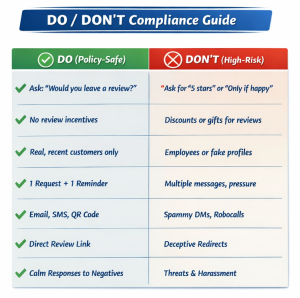
These are the big ones to avoid:
- Incentivized reviews. Even “any review gets a gift card” is prohibited as fake engagement.
- Review gating (routing unhappy customers away from Google or only asking likely promoters).
- Over-engineered review stations (same device/network footprints).
- Fake reviews (friends, family, staff).
- Asking customers to include keywords/city names (it can feel coached and unnatural).
Google also notes profiles can face restrictions such as being unable to receive new reviews for a period, having existing reviews unpublished, or showing warnings if fake reviews were removed.
How do you choose the right review generation service in Indianapolis?
Here’s the checklist that separates “compliance-first” from “high-risk shortcuts”:
Look for:
- Clear stance against incentives and gating (in writing).
- Ability to use Google’s review link/QR code workflow.
- Controls for frequency + one-reminder limit.
- Simple reporting you can review weekly.
- Training/scripts your team will actually use.
- Support for responding to reviews (or at least response playbooks).
Red flags:
- “Guaranteed 5-star reviews”
- “We remove negative reviews”
- “We’ll get you reviews fast” with no mention of policy compliance
FAQ
Is it okay to ask customers to mention “Indianapolis” in their review?
You can’t control what customers write, and you shouldn’t coach review content. Keep your request neutral and focused on their experience.
Can we offer a discount, raffle, or gift card for leaving a review?
Google treats incentivized reviews as fake engagement and says it’s strictly prohibited.
How many review requests can we send before it feels spammy?
A common safe baseline is one request plus one reminder. Beyond that, you risk annoyance and diminishing returns.
Why did a customer say they left a review, but it’s not showing?
Reviews can take a few days due to policy checks; some may be removed for violations or impacted by technical issues.
Should we respond to every review (even short ones)?
You don’t need to write a novel for every review, but responding shows engagement. Google recommends keeping replies relevant, professional, and not promotional.
Can employees, family, or vendors leave reviews?
That can create conflicts of interest and looks inauthentic. Stick to genuine customer experiences and avoid anything that could be perceived as manipulated engagement.
Can we remove a negative review from Google?
You can report reviews that violate policies, but Google won’t remove reviews just because you dislike them.
Conclusion
Getting more Google reviews without violating policies isn’t about tricks—it’s about a simple, repeatable workflow: ask at the right moment, make it easy with a link/QR code, keep the language neutral, follow up once (max), and respond professionally. That system builds trust, improves competitiveness, and makes every marketing dollar work harder.
Why Qball Digital is Your Ideal Choice for Review Generation in Indianapolis?
Qball Digital approaches review growth the way Google expects it to happen: through real customer experiences, consistent outreach, and compliance-first execution. That means no incentives, no gating, and no risky shortcuts that can lead to missing reviews—or restrictions on your Business Profile.
More importantly, Qball Digital treats reviews like a performance asset, not a vanity metric. By building a weekly review engine with tracking and clear reporting, you can connect review velocity to the metrics that matter—higher click confidence, improved conversion rates, and stronger lead quality—so your reputation supports real revenue growth.
Get More Google Reviews with Qball Digital
If you want a policy-safe system that consistently earns reviews (without risking takedowns), Qball Digital can help you build it.
Book a Review Growth Audit and you’ll get:
- A compliance check of your current review process
- A review request workflow (timing, channels, follow-ups)
- Copy-and-paste SMS/email templates
- A simple reporting dashboard plan you can review weekly